Domain 2: IT Risk Assessment
Arrow keys or space to move, F for full screen. Read the notes
IT Risk Assessment
19 topics · Risk events and threats · Vulnerabilities and risk factors · Risk scenarios · Assessment methods · Analysis and evaluation · Risk register
D2IT Risk Events, Loss Types and Business Outcomes
What an IT risk event is, the common families of events, the types of loss they cause and how to trace each event through to the business outcome it threatens.
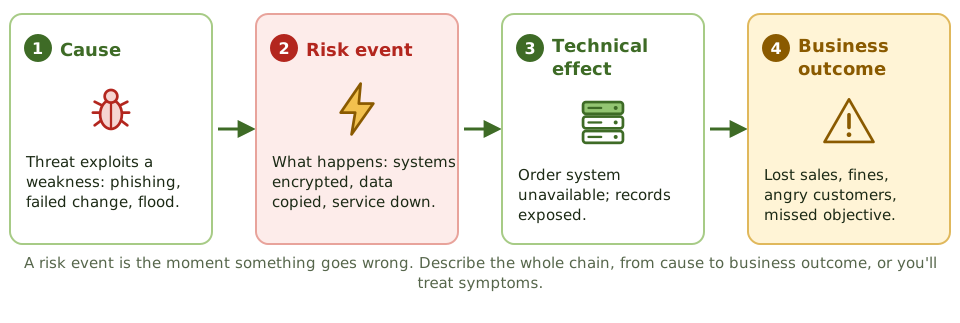
From cause to outcome
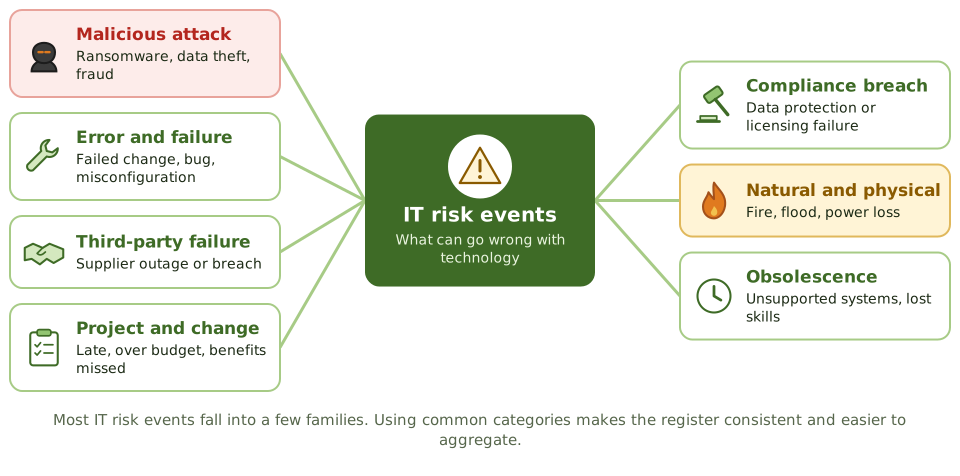
Families of IT risk events
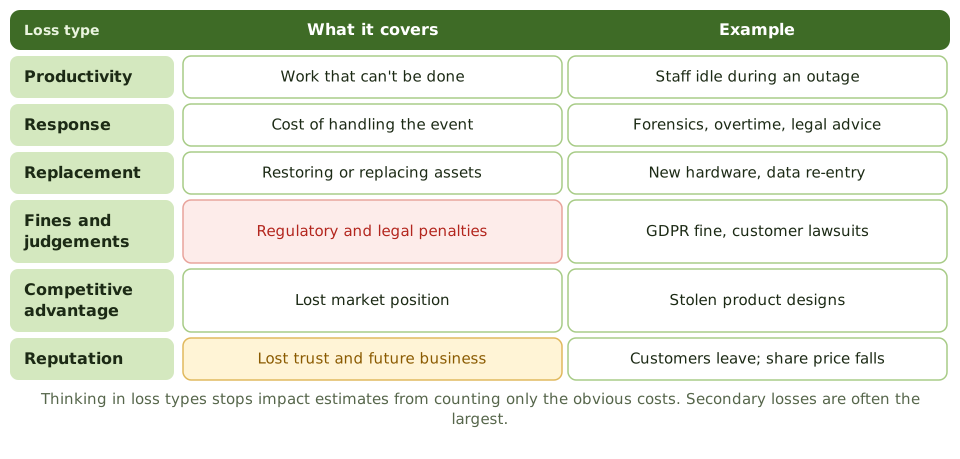
Types of loss
IT risk is broader than security
- 1Benefit risk: IT investments that don't deliver value.
- 2Delivery risk: projects late, over budget or failing.
- 3Operations risk: outages, errors, performance.
- 4Security and compliance risk: breaches, fines.
How the exam asks about it
| If the question asks… | The answer is usually… |
|---|---|
| Loss MOST often underestimated | Secondary losses: fines, reputation, lost customers |
| BEST way to describe a risk event | Cause, event and business consequence |
| Benefit of standard event categories | Consistent register and aggregation |
| Is a failed IT project an IT risk? | Yes: delivery and benefit risk |
Key takeaways
- ✓A risk event is the moment something goes wrong; describe the chain from cause to event to business outcome.
- ✓IT risk events include attacks, errors and failures, supplier failures, project failures, compliance breaches, physical events and obsolescence.
- ✓Using common event categories makes the register consistent and easier to aggregate.
- ✓Losses include productivity, response, replacement, fines, competitive advantage and reputation.
- ✓Secondary losses such as fines and lost customers are often larger than the direct costs.
- ✓IT risk includes missed opportunities and failed projects, not just security incidents.
Exam traps
- !Counting only the direct technical cost of an event.
- !Treating IT risk as only security risk.
- !Describing the cause (a vulnerability) as if it were the event.
- !Stopping the analysis at the technical effect instead of the business outcome.
Threat Sources, Actors and Motivations
The sources of threat to IT (adversarial, accidental, structural and environmental), the main threat actors and why their motivation and capability shape likelihood.
Four sources of threat
Who attacks, and why
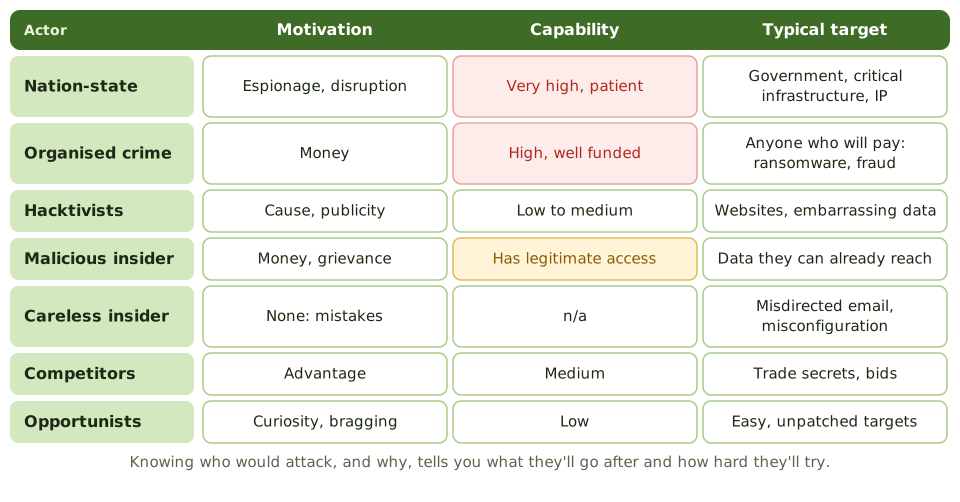
Motivation drives likelihood
A threat is more likely when an actor has both the motive and the capability. A hospital is attractive to ransomware gangs because it can't tolerate downtime; a defence contractor attracts nation-states because of its secrets.
Don't forget the insider
- 1Already has access and knowledge.
- 2Bypasses perimeter controls.
- 3Can be malicious or simply careless.
- 4Controls: least privilege, SoD, monitoring, leaver process.
How the exam asks about it
| If the question asks… | The answer is usually… |
|---|---|
| Why consider threat actor motivation | It affects likelihood and targets |
| Threat that bypasses perimeter controls | Insider |
| MOST common cause of many incidents | Human error and failures, not only attacks |
| Small organisation thinks it's not a target | Opportunistic and criminal actors still target it |
Key takeaways
- ✓Threat sources are adversarial (people with intent), accidental (mistakes), structural (failures) and environmental (natural and physical events).
- ✓Adversarial actors include nation-states, organised crime, hacktivists, insiders, competitors and opportunists.
- ✓Motivation and capability decide what an actor targets and how hard they try.
- ✓Insiders matter because they already have legitimate access.
- ✓Accidental and structural threats cause many incidents and are often underweighted.
Exam traps
- !Focusing only on external hackers and ignoring errors, failures and insiders.
- !Rating likelihood without considering who would want to attack and why.
- !Assuming the organisation is too small to be targeted.
- !Treating every actor as equally capable.
The Changing Threat Landscape and Threat Modelling
How the risk practitioner keeps up with changing threats through threat intelligence, and uses threat modelling to find threats to a system before it's built.
Threats keep changing
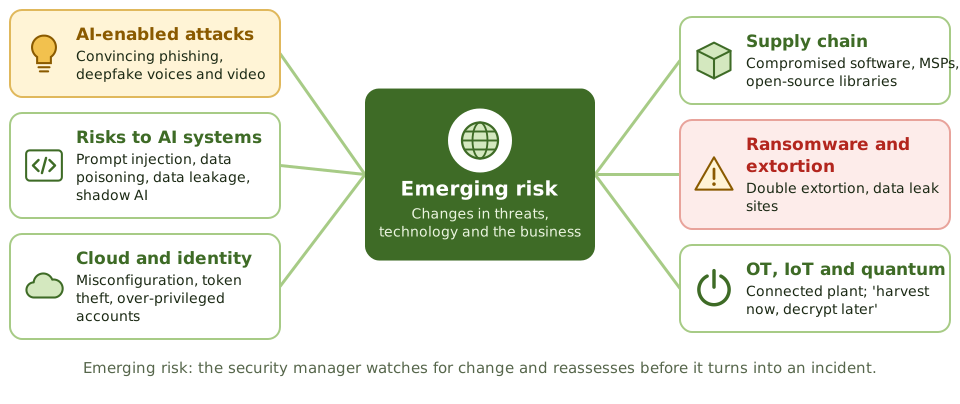
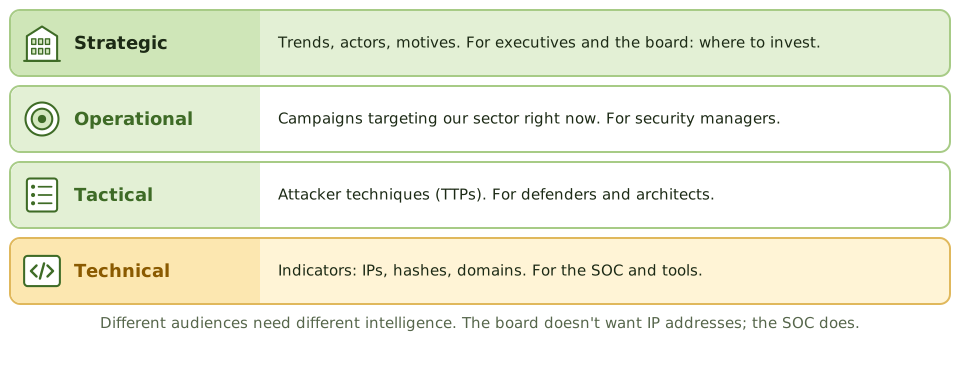
Using threat intelligence
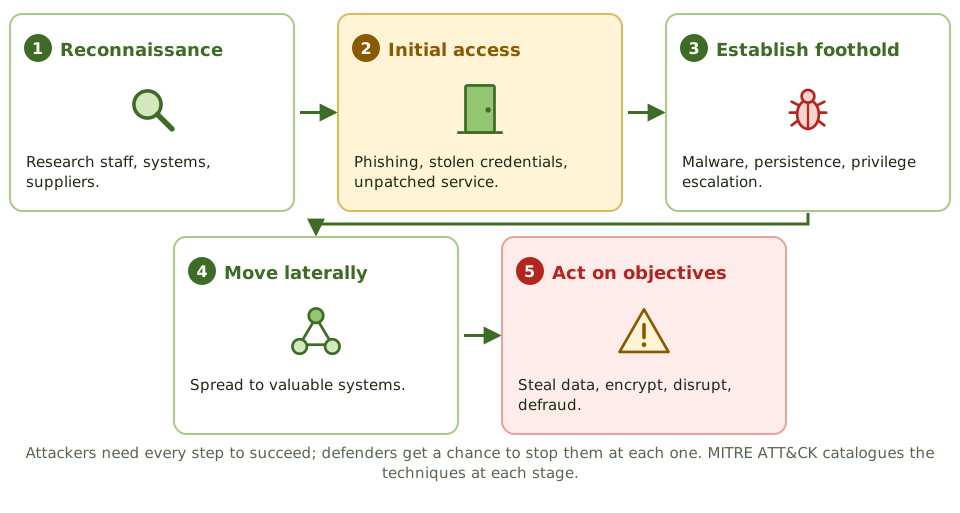
How attacks unfold
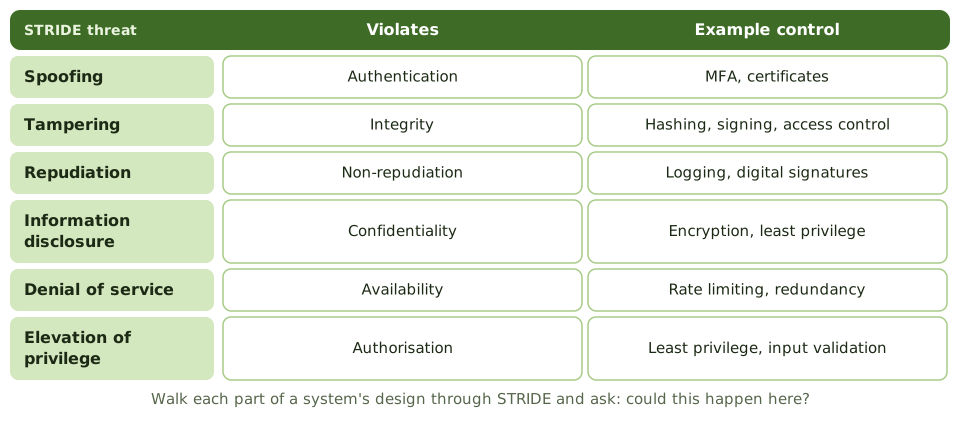
Threat modelling
How the exam asks about it
| If the question asks… | The answer is usually… |
|---|---|
| BEST time for threat modelling | During design |
| Most useful threat intelligence | Filtered for relevance to the organisation |
| Major new threat in the sector | Reassess affected risk scenarios now |
| Intelligence for the board | Strategic trends and business implications |
Key takeaways
- ✓The threat landscape changes constantly; risk assessments must be updated when it does.
- ✓Threat intelligence is useful only when filtered for relevance to the organisation's sector, geography and technology.
- ✓Different audiences need different levels of intelligence: strategic, operational, tactical and technical.
- ✓Threat modelling finds threats to a system during design, when fixes are cheapest.
- ✓Frameworks such as STRIDE and MITRE ATT&CK structure threat modelling and analysis.
Exam traps
- !Collecting large volumes of threat feeds without filtering or using them.
- !Threat modelling after go-live instead of during design.
- !Waiting for the annual assessment to react to a major new threat.
- !Giving the board technical indicators instead of strategic trends.
Vulnerabilities, Control Deficiencies and Risk Conditions
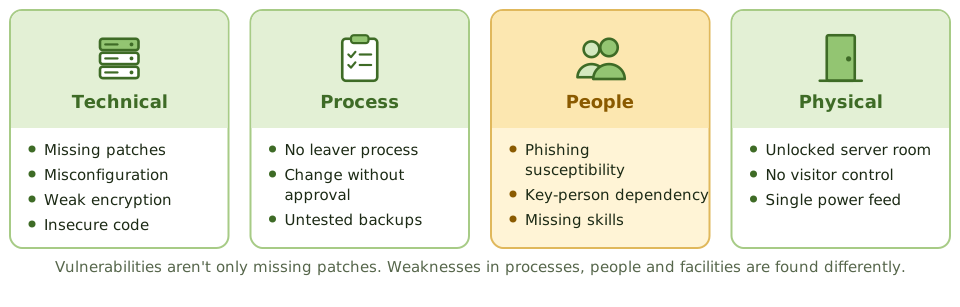
The kinds of weakness that let threats cause harm, from technical flaws to process and people gaps, how control deficiencies are classified and how to prioritise vulnerabilities by risk.
Where weaknesses hide
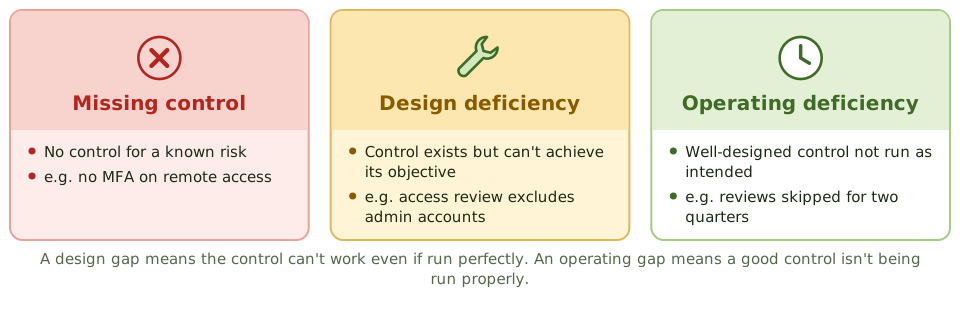
Control deficiencies
Finding them
- 1Vulnerability scans and penetration tests.
- 2Audit findings and control testing.
- 3Incident and near-miss reviews.
- 4Control self-assessments and process walkthroughs.
- 5Supplier assurance reports.
Prioritising by risk
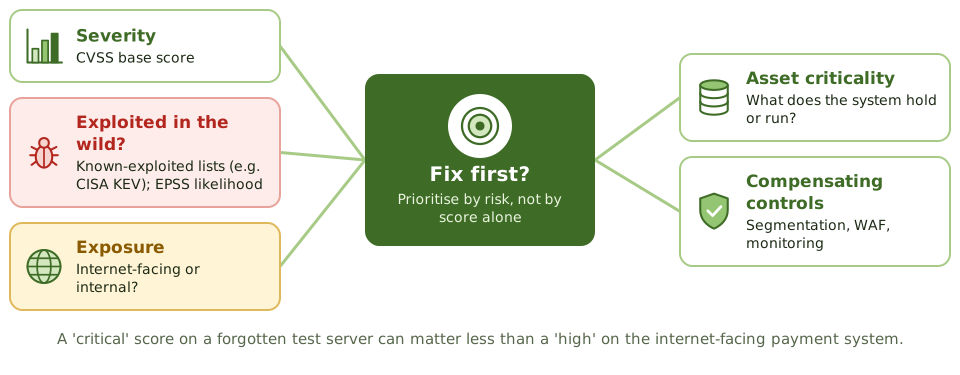
How the exam asks about it
| If the question asks… | The answer is usually… |
|---|---|
| BEST basis for prioritising vulnerabilities | Risk to the business, not score alone |
| Control exists but can't achieve its objective | Design deficiency |
| Good control not performed | Operating deficiency |
| Vulnerability with no realistic threat | Low risk; monitor |
Key takeaways
- ✓Vulnerabilities are weaknesses in technology, processes, people or facilities that a threat could exploit.
- ✓Control deficiencies are missing controls, design deficiencies or operating deficiencies.
- ✓Sources include scans, penetration tests, audits, incidents, control testing and self-assessments.
- ✓Prioritise vulnerabilities by risk: exploitability, exposure, asset criticality and compensating controls, not severity score alone.
- ✓A vulnerability with no realistic threat is low risk, but should be monitored as threats change.
Exam traps
- !Treating every scanner finding as high risk because of its CVSS score.
- !Looking only for technical vulnerabilities.
- !Confusing a design deficiency (control can't work) with an operating deficiency (control not run).
- !Ignoring vulnerabilities in third-party systems the organisation relies on.
Identifying Internal and External Risk Factors
The internal and external conditions that make IT risk events more likely or more damaging, and how the risk practitioner uses them to keep scenarios and ratings realistic.
What risk factors are
Risk factors are conditions that make an event more likely or more damaging. They aren't events themselves. High staff turnover in IT doesn't cause an outage, but it makes one more likely and slower to fix.
Internal and external
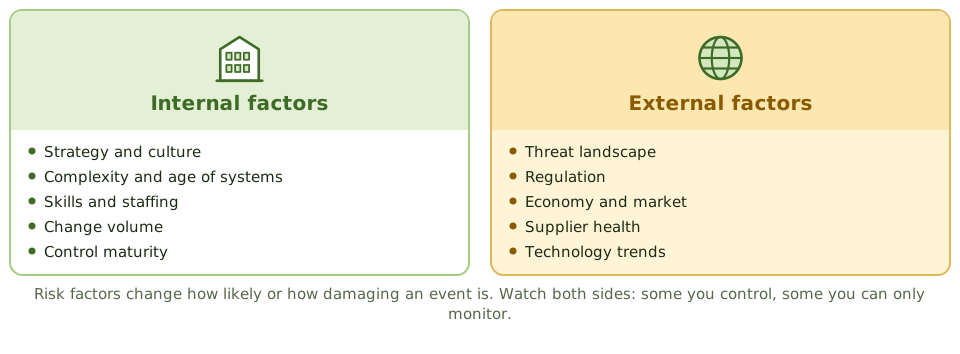
Using risk factors
- 1Adjust likelihood and impact estimates.
- 2Spot when ratings need review.
- 3Choose leading key risk indicators.
- 4Explain why a risk is rising or falling.
Factor versus event
| Risk factor | Related risk event |
|---|---|
| Ageing, unsupported systems | System failure or exploited vulnerability |
| New data protection law | Regulatory breach and fine |
| Rapid growth in change volume | Failed change causes outage |
| Key supplier in financial trouble | Supplier stops delivering service |
How the exam asks about it
| If the question asks… | The answer is usually… |
|---|---|
| Purpose of identifying risk factors | Make likelihood and impact estimates realistic |
| Significant change in a risk factor | Review the related risk ratings |
| Good source of leading KRIs | Risk factors |
| External factors you can't control | Still monitor and include in assessment |
Key takeaways
- ✓Risk factors are conditions that change the likelihood or impact of risk events.
- ✓Internal factors include strategy, culture, system complexity, skills, change volume and control maturity.
- ✓External factors include the threat landscape, regulation, the economy, supplier health and technology trends.
- ✓Changes in risk factors are early signals that risk ratings need reviewing.
- ✓Many risk factors make good key risk indicators.
Exam traps
- !Rating risk only on technical facts and ignoring organisational factors like skills or culture.
- !Ignoring external factors because the organisation can't control them.
- !Leaving ratings unchanged after a major change in risk factors.
- !Confusing a risk factor with a risk event.
Building IT Risk Scenarios
How to write risk scenarios that the business recognises and can rate, using top-down and bottom-up approaches, and why scenarios are the core of IT risk assessment.
Why scenarios
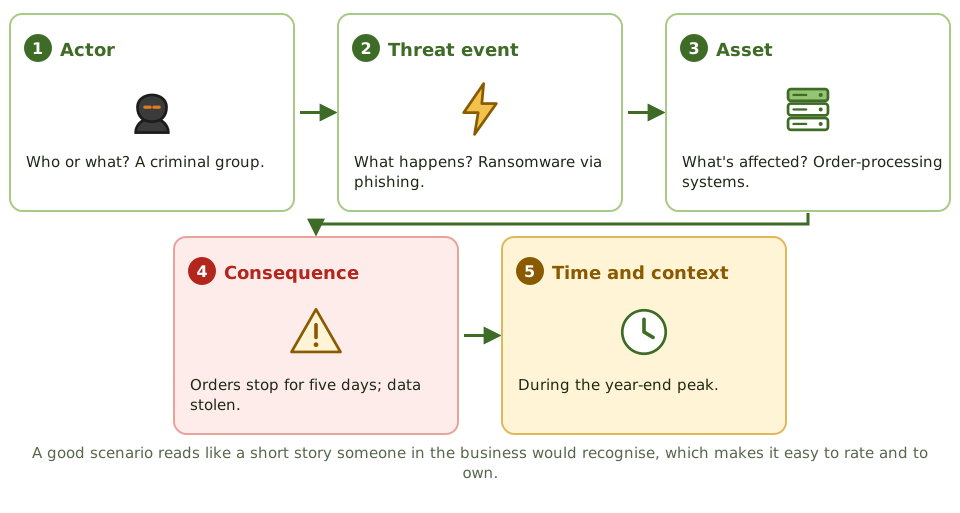
'Cyber risk' can't be rated or owned. 'A criminal group phishes finance staff and diverts a 500,000 payment' can. Scenarios make risk concrete enough for the business to judge likelihood and impact and decide what to do.
Anatomy of a scenario
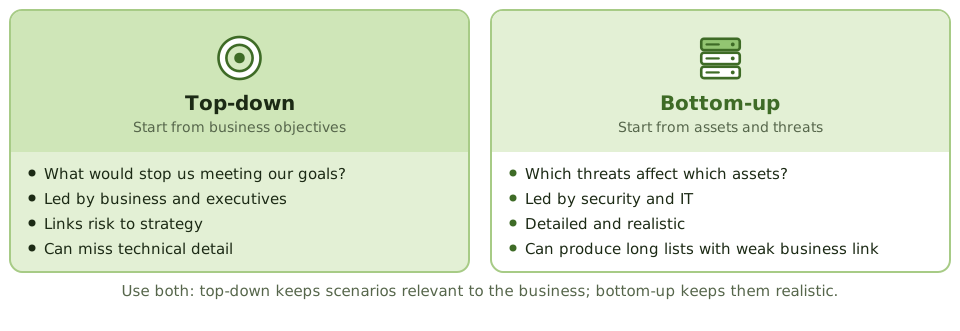
Top-down and bottom-up
Building them well
- 1Involve business owners and technical experts together.
- 2Use generic scenario libraries only as a starting point.
- 3Keep the number manageable: focus on what matters.
- 4Link each scenario to an objective and an owner.
How the exam asks about it
| If the question asks… | The answer is usually… |
|---|---|
| PRIMARY benefit of risk scenarios | Make risk concrete for business decisions |
| BEST way to build scenarios | Workshops with business and technical stakeholders |
| Top-down approach starts with | Business objectives |
| Using another firm's scenario list | Tailor it to this organisation |
Key takeaways
- ✓A risk scenario describes an actor, a threat event, the asset affected, the consequence and the timing or context.
- ✓Scenarios turn abstract risk into concrete stories that owners can recognise, rate and own.
- ✓Top-down scenarios start from business objectives; bottom-up scenarios start from assets and threats.
- ✓Use both approaches: top-down for relevance, bottom-up for realism.
- ✓Build scenarios with business and technical stakeholders together.
- ✓Generic risk lists from other organisations are a starting point, not a substitute.
Exam traps
- !Writing one-word scenarios such as 'hackers' or 'cyber'.
- !Building scenarios only with the IT team.
- !Copying another organisation's scenario list without tailoring.
- !Producing hundreds of technical scenarios with no business link.
Evaluating Scenarios for Completeness and Relevance
How to check that each risk scenario is realistic, specific, business-linked and owned, and that the set as a whole covers the organisation's key assets, processes and threats.
Checking each scenario
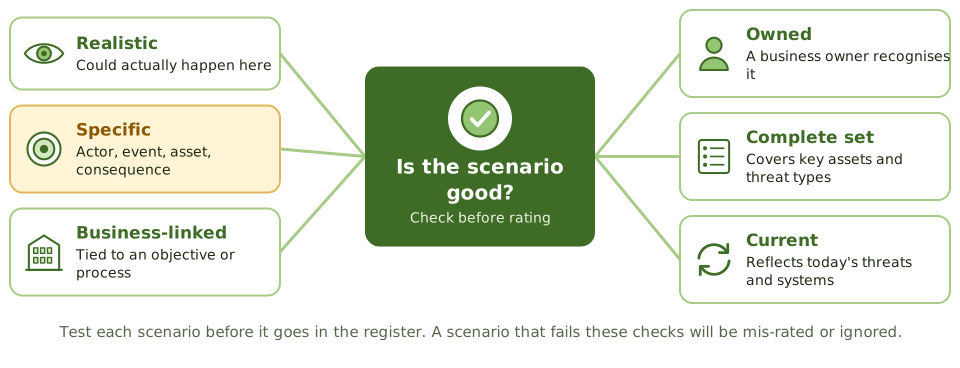
Checking the whole set
| Coverage question | If the answer is no |
|---|---|
| Are all critical processes covered? | Add scenarios for the gaps |
| Are all event types represented? | Add errors, failures, supplier events |
| Are key third parties included? | Add supplier and outsourcing scenarios |
| Do recent incidents map to a scenario? | The set is missing something |
Validating with the business
A scenario is ready when its owner reads it and says 'yes, that could happen to us, and here's what it would cost'. If the owner doesn't recognise it, it will be mis-rated or ignored.
How the exam asks about it
| If the question asks… | The answer is usually… |
|---|---|
| BEST way to validate scenarios | Review with business owners |
| Test of scenario completeness | Compare with incidents, assets and processes |
| When to update scenarios | On significant business, technology or threat change |
| Scenario no owner recognises | Rework it before rating |
Key takeaways
- ✓Check each scenario before rating: realistic, specific, business-linked, owned and current.
- ✓Check the set as a whole: does it cover key processes, assets, threat types and third parties?
- ✓Validate scenarios with the business owners who will own them.
- ✓Compare the set with incidents, audit findings and industry data to find gaps.
- ✓Review scenarios when the business, technology or threat landscape changes.
Exam traps
- !Rating scenarios before checking whether they're realistic and complete.
- !Covering only cyberattacks and missing errors, failures and supplier events.
- !Keeping scenarios that no longer match current systems.
- !Accepting scenarios no business owner recognises.
Common Risk Scenario Errors
The mistakes that make risk scenarios useless (too vague, too technical, too extreme, too many or out of date) and how to fix each before rating.
Weak versus better
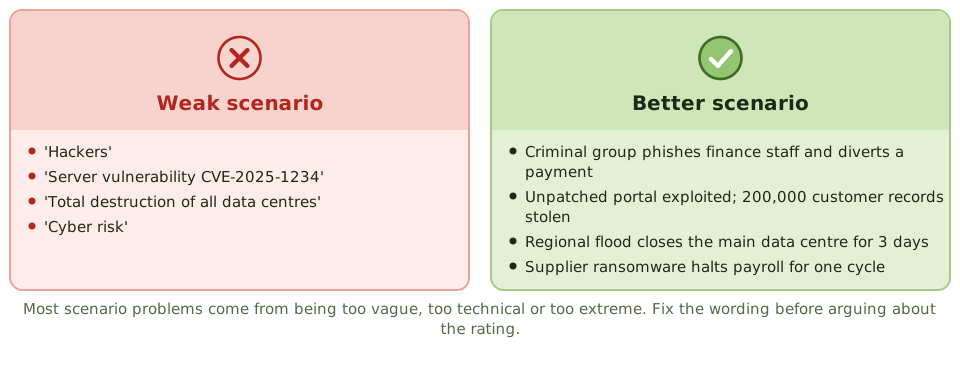
The five common errors
| Error | Fix |
|---|---|
| Too vague | Add actor, event, asset and consequence |
| Too technical | State the business outcome |
| Only worst case | Add a realistic severe case |
| Too many, overlapping | Group similar scenarios |
| Several events in one | Split into separate scenarios |
Realistic versus worst case
If every scenario is 'total loss of all systems', everything rates critical and nothing can be prioritised. Assess the realistic severe case alongside the extreme, so ratings reflect what's actually likely.
How the exam asks about it
| If the question asks… | The answer is usually… |
|---|---|
| Scenario reads 'cyber risk' | Too vague; make it specific |
| Scenario is a CVE number | It's a vulnerability; describe the business event |
| All scenarios rate critical | Scenarios are too extreme; use realistic cases |
| Scenario covers several events | Split it |
Key takeaways
- ✓Vague scenarios such as 'cyber risk' can't be rated or owned.
- ✓Purely technical scenarios (a CVE number) describe a cause, not a business risk.
- ✓Worst-case-only scenarios exaggerate; use realistic severe cases as well.
- ✓Too many scenarios dilute attention; group and focus on what matters.
- ✓Scenarios must be refreshed when systems and threats change.
Exam traps
- !Arguing about a rating when the real problem is the scenario wording.
- !Including only catastrophic scenarios, which makes everything look critical.
- !Writing scenarios as vulnerabilities rather than events with consequences.
- !Combining several different events into one scenario.
Risk Assessment Concepts and Standards
The building blocks of IT risk assessment (assets, threats, vulnerabilities, likelihood and impact), the standard process steps and the main standards that describe them.
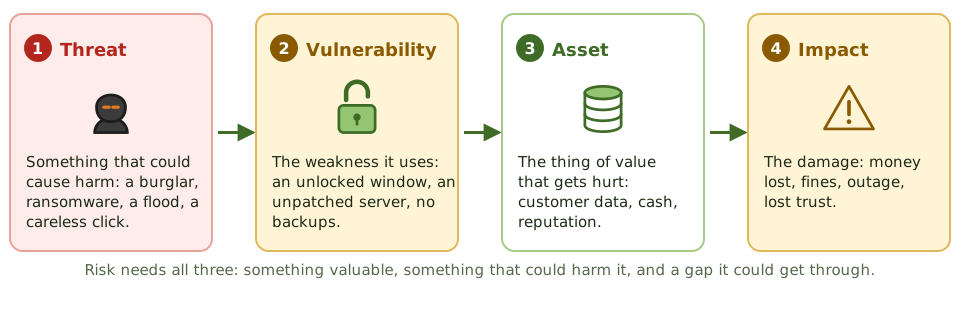
The ingredients of risk
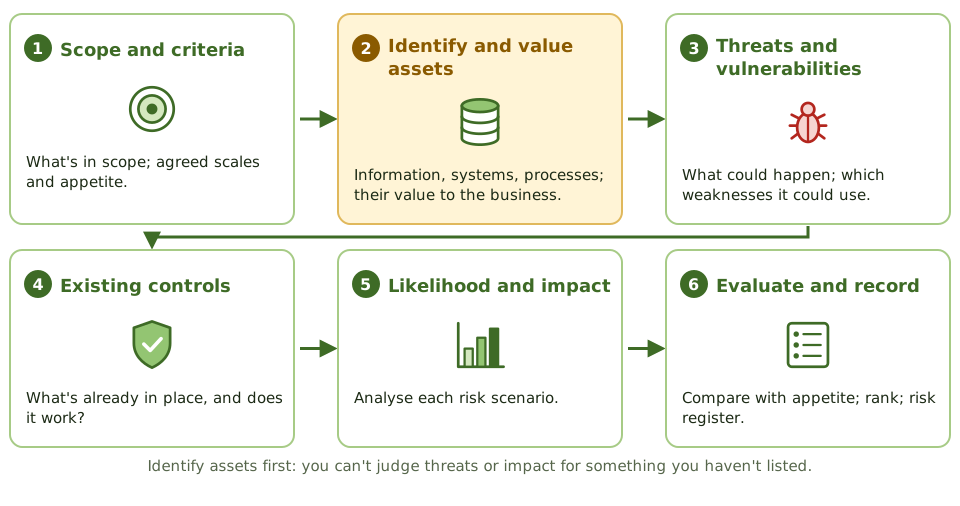
The standard steps
Standards that describe it
| Standard | What it offers |
|---|---|
| NIST SP 800-30 | How to prepare, conduct and maintain IT risk assessments |
| ISO/IEC 27005 | Information security risk management for ISO 27001 |
| ISO 31000 / IEC 31010 | Generic risk process and assessment techniques |
Assessment is not a scan
A vulnerability scan lists technical weaknesses. A risk assessment asks which threats could use them, against which assets, how likely that is and what it would cost the business. Scans are one input, not the assessment.
How the exam asks about it
| If the question asks… | The answer is usually… |
|---|---|
| FIRST step after setting scope | Identify and value assets |
| Before estimating residual risk | Evaluate existing controls |
| Difference between scan and assessment | Assessment considers threats, likelihood and business impact |
| Standard for IT risk assessment | NIST SP 800-30 |
Key takeaways
- ✓Risk combines the likelihood of a threat exploiting a vulnerability and the impact on an asset.
- ✓The standard steps are scope and criteria, assets, threats and vulnerabilities, existing controls, likelihood and impact, then evaluate and record.
- ✓Existing controls must be considered, and tested where possible, before estimating residual risk.
- ✓NIST SP 800-30 and ISO/IEC 27005 describe IT and information security risk assessment.
- ✓Risk assessment is repeated periodically and when significant change occurs.
Exam traps
- !Starting with threats before identifying the assets at risk.
- !Assuming existing controls work without checking.
- !Treating a vulnerability scan as a risk assessment.
- !Running a one-off assessment and never updating it.
Qualitative, Semi-Quantitative and Quantitative Analysis
The three ways to analyse risk, what each is good and bad at, and how to choose the right approach for the decision and the data available.
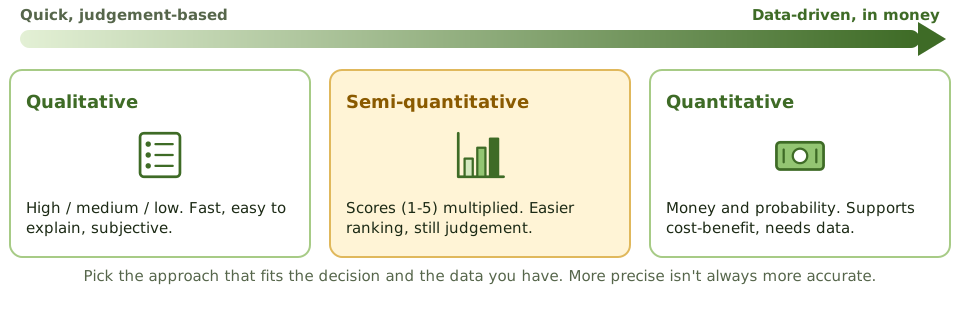
Three approaches
Strengths and weaknesses
| Approach | Strength | Weakness |
|---|---|---|
| Qualitative | Fast, easy to explain, no data needed | Subjective; hard to compare costs |
| Semi-quantitative | Easier ranking and aggregation | Scores look precise but aren't |
| Quantitative | Money terms; supports cost-benefit | Needs data; time-consuming |
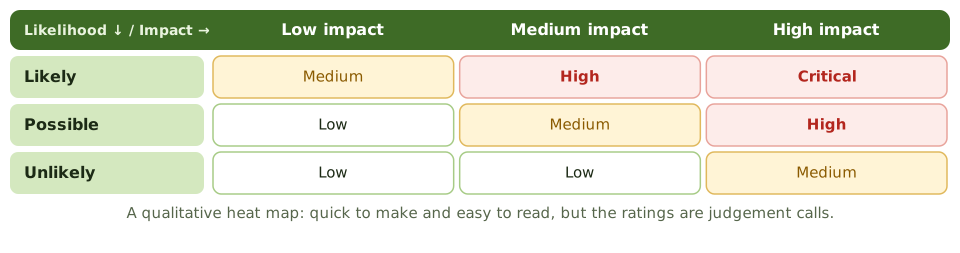
The heat map
Choosing an approach
- 1What decision will the result support?
- 2Is reliable loss and frequency data available?
- 3How much time and expertise do we have?
- 4Does it fit the enterprise risk method?
How the exam asks about it
| If the question asks… | The answer is usually… |
|---|---|
| Advantage of qualitative analysis | Quick, needs little data |
| Advantage of quantitative analysis | Supports cost-benefit in money |
| Main weakness of quantitative | Depends on reliable data |
| MOST important when choosing | Fit with the decision and available data, applied consistently |
Key takeaways
- ✓Qualitative analysis uses descriptive scales such as high, medium and low; it's fast but subjective.
- ✓Semi-quantitative analysis assigns numbers to scales and combines them; it ranks more easily but is still judgement-based.
- ✓Quantitative analysis uses money and probabilities; it supports cost-benefit decisions but needs reliable data.
- ✓Choose the approach that fits the decision and the data available, and apply it consistently.
- ✓Precise-looking numbers based on weak data can mislead.
Exam traps
- !Assuming quantitative analysis is always more accurate.
- !Treating semi-quantitative scores as if they were real measurements.
- !Mixing approaches so that ratings can't be compared.
- !Using qualitative ratings to justify detailed investment cases.
Quantitative Methods: ALE, FAIR and Monte Carlo
How to express IT risk in money, from the classic SLE and ALE formulas to FAIR and Monte Carlo simulation, and how to use the results in cost-benefit decisions.
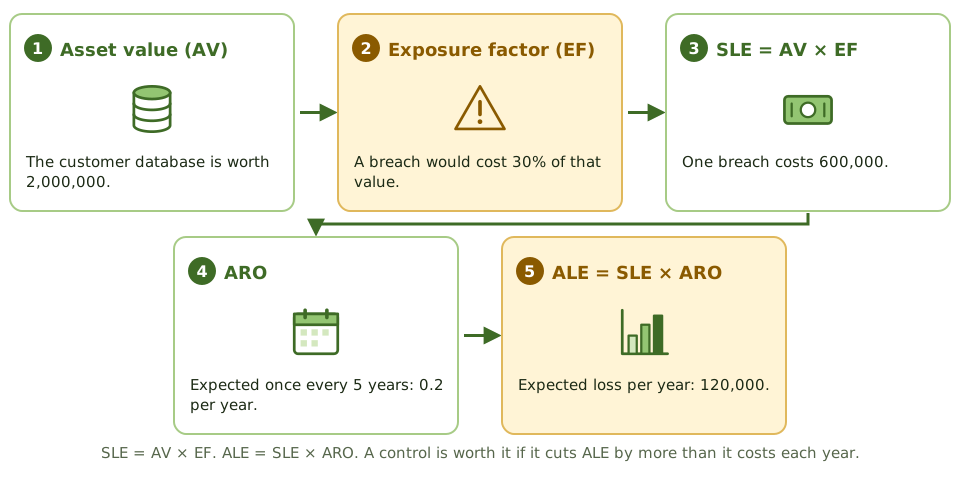
The classic formulas
Is the control worth it?
| Item | Value |
|---|---|
| ALE before control | 120,000 |
| ALE after control | 30,000 |
| Reduction in ALE | 90,000 |
| Annual cost of control | 40,000 |
| Net benefit | 50,000 a year: justified |
FAIR
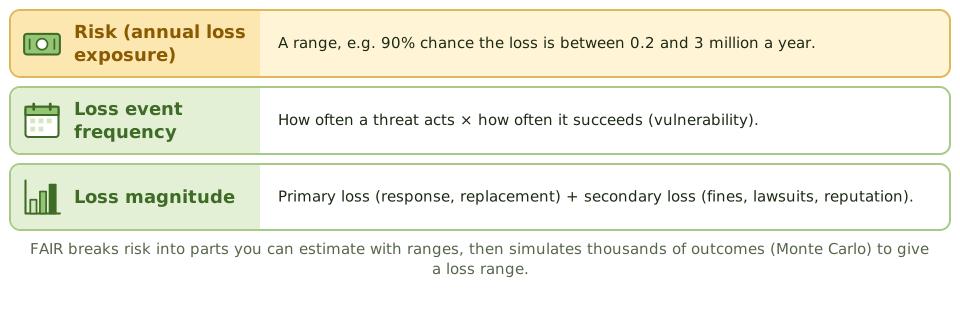
Monte Carlo
Instead of single guesses, estimators give ranges: 'between two and six events a year, each costing 50,000 to 400,000'. Monte Carlo runs thousands of random combinations to show the range of likely annual losses and their probabilities.
How the exam asks about it
| If the question asks… | The answer is usually… |
|---|---|
| ALE formula | SLE × ARO |
| When a control is justified | ALE reduction exceeds its annual cost |
| FAIR's two main factors | Loss event frequency and loss magnitude |
| Purpose of Monte Carlo simulation | Produce a range of outcomes with probabilities |
Key takeaways
- ✓SLE = asset value × exposure factor; ALE = SLE × annualised rate of occurrence.
- ✓A control is financially justified when it reduces ALE by more than its annual cost.
- ✓FAIR breaks risk into loss event frequency and loss magnitude, estimated as ranges.
- ✓Monte Carlo simulation turns ranges into a distribution of possible annual losses.
- ✓Quantitative results are only as good as their input data and assumptions.
Exam traps
- !Confusing SLE with ALE.
- !Comparing a control's cost with total ALE instead of the reduction in ALE.
- !Presenting a single precise number when inputs are uncertain.
- !Using quantitative methods with no data to support the inputs.
Risk Analysis Techniques: Bow-Tie, Fault Tree, Event Tree and Delphi
The structured techniques risk practitioners use to analyse causes, consequences and controls, and to get reliable estimates from experts, with guidance on when to use each.
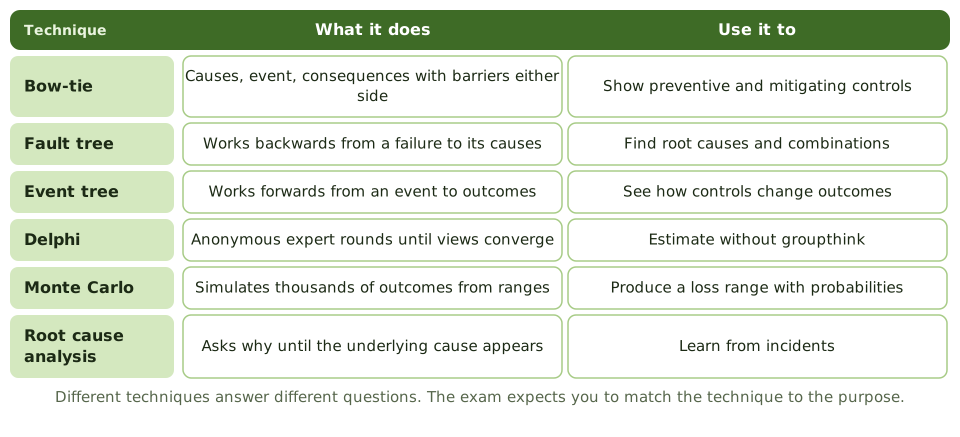
Choosing a technique
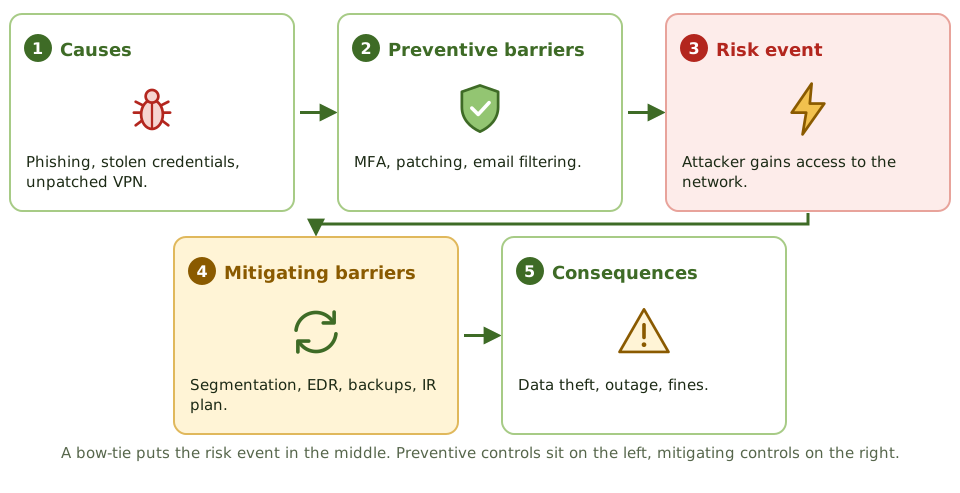
The bow-tie
Fault tree versus event tree
Getting good estimates
- 1Delphi: anonymous rounds until experts converge.
- 2Structured interviews and workshops with clear scales.
- 3Calibrate estimates against incident and industry data.
How the exam asks about it
| If the question asks… | The answer is usually… |
|---|---|
| Technique showing preventive and mitigating controls | Bow-tie |
| Work backwards from a failure to causes | Fault tree analysis |
| Avoid groupthink in expert estimates | Delphi technique |
| Prevent an incident recurring | Root cause analysis |
Key takeaways
- ✓Bow-tie analysis shows causes and preventive controls on one side and consequences and mitigating controls on the other.
- ✓Fault tree analysis works backwards from a failure to the combinations of causes that produce it.
- ✓Event tree analysis works forwards from an event through control success or failure to possible outcomes.
- ✓The Delphi technique gathers anonymous expert estimates in rounds to avoid groupthink.
- ✓Root cause analysis finds the underlying cause so that fixes prevent recurrence.
- ✓Match the technique to the question you need to answer.
Exam traps
- !Confusing fault tree (backwards to causes) with event tree (forwards to outcomes).
- !Using open group discussion where Delphi's anonymity is needed to avoid dominant voices.
- !Treating symptoms because root cause analysis wasn't done.
- !Choosing a complex technique where a simple workshop would do.
Choosing a Consistent Assessment Methodology
Why risk assessments need agreed methods, scales and criteria, how to define likelihood and impact scales the business understands, and how consistency makes results comparable over time.
Why consistency matters
If the finance team's 'high' means a 1 million loss and IT's 'high' means a server outage, nobody can compare risks or add them up. A common methodology makes results comparable across teams and across years.
Setting up the method
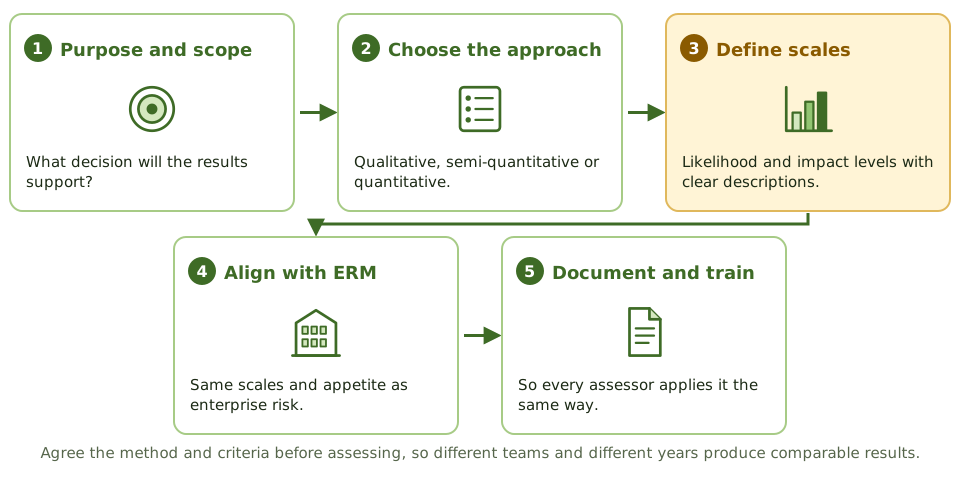
Describing the scales
| Impact level | Business description |
|---|---|
| 1 Minor | Under 50,000; no customer impact |
| 2 Moderate | 50,000-500,000; some customers affected |
| 3 Major | 0.5-5 million; regulator notified |
| 4 Severe | Over 5 million; licence or strategy at risk |
Keeping it consistent
- 1Document the methodology and examples.
- 2Train everyone who assesses risk.
- 3Calibrate ratings in review sessions.
- 4Change the method only deliberately, and restate past results.
How the exam asks about it
| If the question asks… | The answer is usually… |
|---|---|
| BEST way to make risk results comparable | Common methodology and scales across the organisation |
| Two assessments differ widely | Check methods, scales and assumptions |
| Most important feature of impact scales | Clear descriptions in business terms |
| Relationship with ERM | Use the same scales as enterprise risk |
Key takeaways
- ✓Agree the method, scales and criteria before assessing.
- ✓Likelihood and impact scales need clear descriptions in business terms for each level.
- ✓Use the same scales as enterprise risk management so IT risks can be compared with other risks.
- ✓Document the methodology and train assessors so different people reach similar results.
- ✓Consistency over time lets trends be measured; change the method only deliberately.
Exam traps
- !Letting each team use its own scales.
- !Defining levels with labels only ('medium') and no descriptions.
- !Changing the method every year, so trends can't be seen.
- !Choosing a methodology because it's popular rather than because it fits.
Translating Technical Events into Business Impact
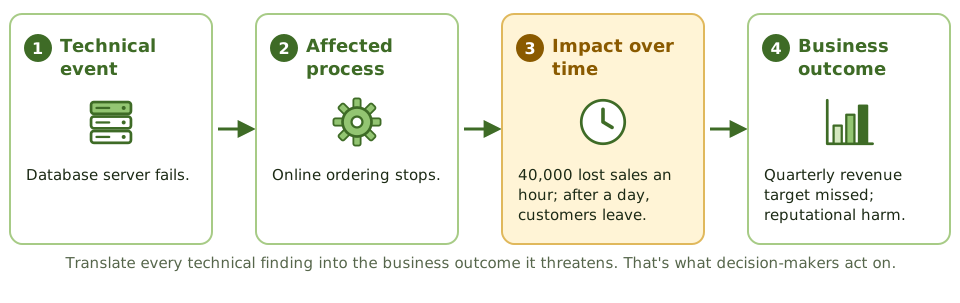
How the risk practitioner turns technical findings and events into the business impact decision-makers act on, using agreed impact categories and the people who know the business.
From technical to business
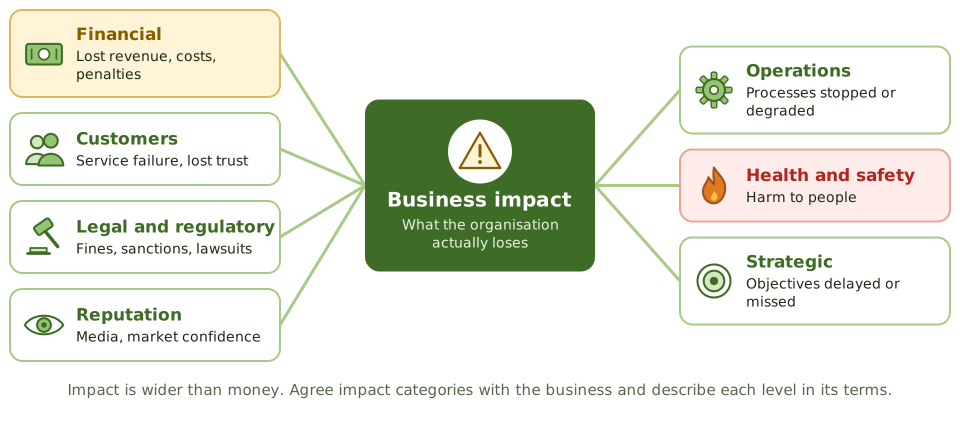
Impact categories
Who knows the impact
| Question | Best source |
|---|---|
| What stops if this system fails? | Business process owner |
| What would the regulator do? | Compliance and legal |
| How would customers react? | Sales, customer service |
| How long to restore? | IT operations |
Time changes impact
Most impacts grow with duration. A one-hour outage of online sales may cost little; a three-day outage may lose customers for good. Ask owners how impact changes over an hour, a day and a week.
How the exam asks about it
| If the question asks… | The answer is usually… |
|---|---|
| BEST way to communicate technical risk to executives | Express it as business impact |
| Best source for impact estimates | Business process owners |
| Impact category often overlooked | Regulatory, reputational or safety impact |
| Why consider duration | Impact grows over time |
Key takeaways
- ✓Decision-makers act on business impact, not technical severity.
- ✓Trace each technical event to the process it affects, how impact grows over time and the resulting business outcome.
- ✓Use agreed impact categories: financial, customers, legal and regulatory, reputation, operations, safety and strategy.
- ✓Business owners are the best source of impact estimates; IT supplies the technical facts.
- ✓Impact often grows with time; a one-hour outage and a one-week outage are different risks.
Exam traps
- !Reporting a risk as 'critical CVE' instead of what it means for the business.
- !Asking IT to estimate business impact.
- !Counting only financial impact and ignoring regulatory, safety or reputational effects.
- !Ignoring how impact changes with duration.
Business Impact Analysis for Risk Prioritisation
How a business impact analysis identifies critical processes and how quickly their disruption causes harm, and how the risk practitioner uses its results to prioritise IT risks.
What a BIA does
A business impact analysis asks one question: if this process stops, how much harm does that cause, and how fast? It sets recovery priorities and objectives. It doesn't ask how likely disruption is; that's the risk assessment's job.
The BIA steps
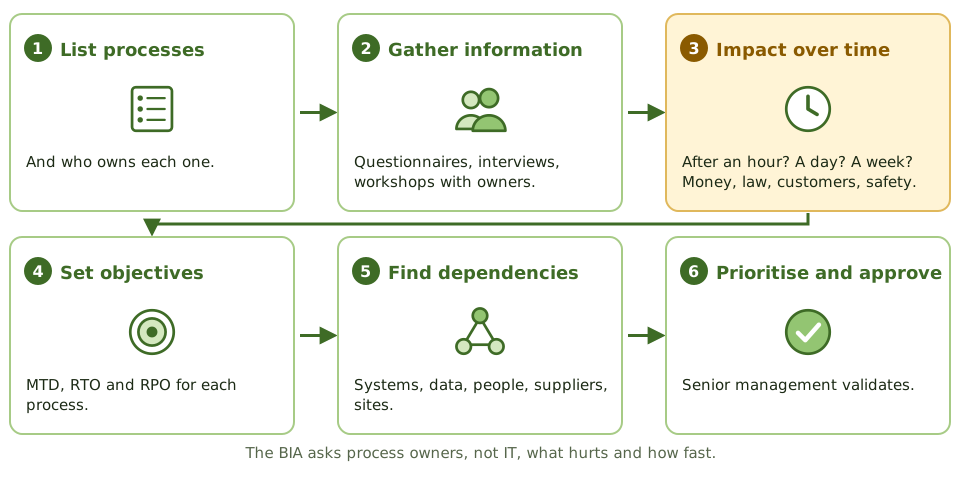
BIA and risk assessment together
| BIA | Risk assessment | |
|---|---|---|
| Main question | Impact of disruption over time | Likelihood and impact of scenarios |
| Focus | Processes and recovery | Threats, vulnerabilities, controls |
| Outputs | MTD, RTO, RPO, priorities | Risk ratings, register |
Using BIA results
- 1Rate impact for scenarios affecting critical processes.
- 2Prioritise risks on assets critical processes depend on.
- 3Set recovery objectives that responses must meet.
- 4Spot dependencies missed by technical inventories.
How the exam asks about it
| If the question asks… | The answer is usually… |
|---|---|
| PRIMARY purpose of a BIA | Identify critical processes and impact of disruption over time |
| Who provides BIA information | Business process owners |
| What a BIA doesn't measure | Likelihood |
| How BIA helps risk management | Prioritises risks by business criticality |
Key takeaways
- ✓A BIA measures the impact of disrupting business processes over time; it doesn't assess likelihood.
- ✓It sets maximum tolerable downtime, recovery time objectives and recovery point objectives.
- ✓Process owners, not IT, provide the impact information.
- ✓BIA results show which assets and dependencies matter most, which sharpens risk prioritisation.
- ✓Risk assessment adds likelihood; together they give a complete picture.
Exam traps
- !Thinking a BIA estimates threat likelihood.
- !Letting IT complete the BIA alone.
- !Treating every process as critical.
- !Forgetting dependencies such as suppliers, data and key staff.
Inherent and Residual Risk
The difference between risk before and after controls, how to estimate residual risk realistically and why the comparison shows the value of controls.
Before and after controls
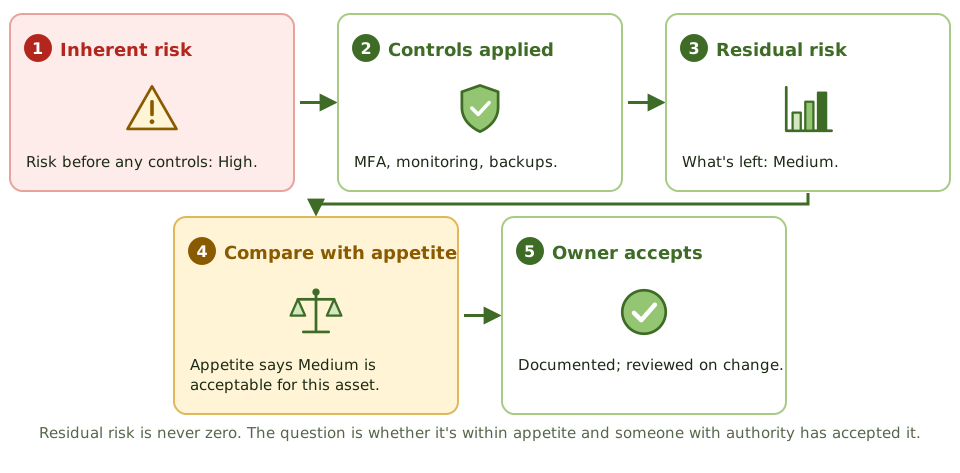
Why both matter
Estimating residual risk honestly
- 1Base it on how controls actually operate, using test results.
- 2Discount controls that are untested or have failed.
- 3Consider how controls could be bypassed.
- 4Re-estimate after control changes or failures.
How the exam asks about it
| If the question asks… | The answer is usually… |
|---|---|
| Risk before controls | Inherent risk |
| Risk after controls | Residual risk |
| Residual risk exceeds appetite | Further response or formal acceptance |
| BEST basis for residual estimate | Controls' tested effectiveness |
Key takeaways
- ✓Inherent risk is the level of risk before considering controls; residual risk is what remains after them.
- ✓Residual risk should reflect controls as they actually operate, not as designed on paper.
- ✓Comparing inherent and residual risk shows how much controls reduce risk, and which controls matter most.
- ✓Residual risk is never zero; it must be within appetite or formally accepted.
- ✓If key controls fail, risk returns towards its inherent level.
Exam traps
- !Estimating residual risk assuming every control works perfectly.
- !Believing residual risk can be eliminated.
- !Closing a risk because controls exist, without checking residual risk against appetite.
- !Ignoring inherent risk, which shows the exposure if controls fail.
Evaluating Risk Against Business Objectives and Appetite
How risk evaluation turns analysed ratings into decisions: comparing each risk with appetite and tolerance, prioritising, and deciding which risks need a response and at what level.
What evaluation does
Analysis gives each risk a rating. Evaluation asks what that rating means for the business: is it acceptable, does it need a response, and who must decide? The yardstick is the appetite and tolerance the board has set.
From rating to action
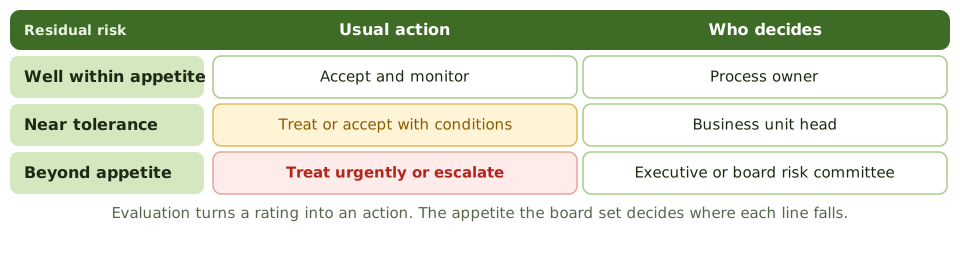
Prioritising
- 1Impact on business objectives first.
- 2Distance from appetite or tolerance.
- 3Speed of onset: how quickly harm arrives.
- 4Trends: is the risk rising?
How the exam asks about it
| If the question asks… | The answer is usually… |
|---|---|
| After analysing a risk | Evaluate it against appetite |
| Risk well within appetite | Accept and monitor |
| MOST important basis for prioritising | Impact on business objectives |
| Risk beyond appetite | Treat or escalate to a level that can accept it |
Key takeaways
- ✓Evaluation compares analysed risk with appetite and tolerance to decide whether a response is needed.
- ✓Risks well within appetite are usually accepted and monitored; risks beyond it need treatment or escalation.
- ✓Prioritise by impact on business objectives, not technical severity.
- ✓The level of authority needed to decide rises with the size of the risk.
- ✓Evaluation comes after analysis and before choosing a response.
Exam traps
- !Choosing a response before comparing the risk with appetite.
- !Prioritising by the order risks were found or by cost to fix.
- !Treating all risks above zero as needing mitigation.
- !Letting a low-level manager decide on a risk beyond appetite.
Creating and Maintaining the IT Risk Register
What goes into an IT risk register, who maintains it, how to keep it accurate and current, and why one consistent register is the backbone of IT risk management.
What a register holds
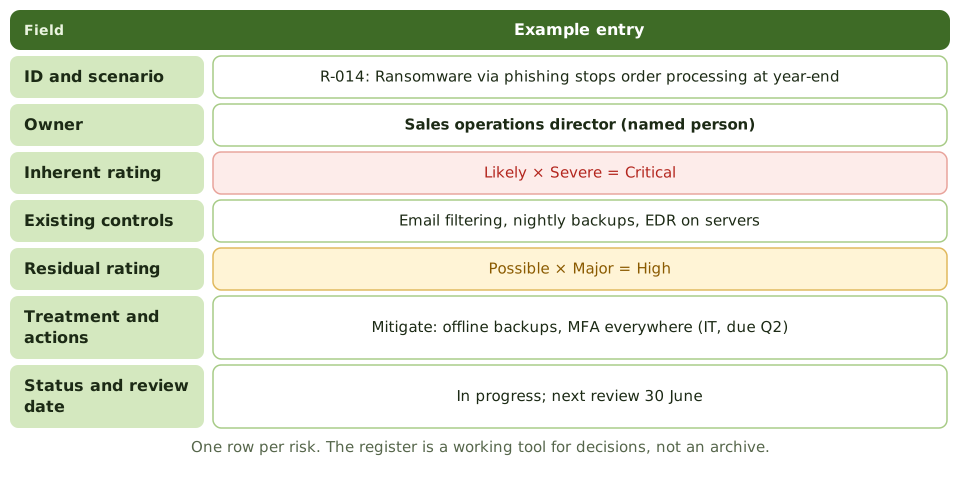
Who does what
| Role | Register responsibility |
|---|---|
| Risk practitioner | Maintains structure, quality and consistency |
| Risk owner | Keeps their entries accurate; approves responses |
| Control and action owners | Update action status |
| Senior management | Reviews top risks and trends |
Keeping it current
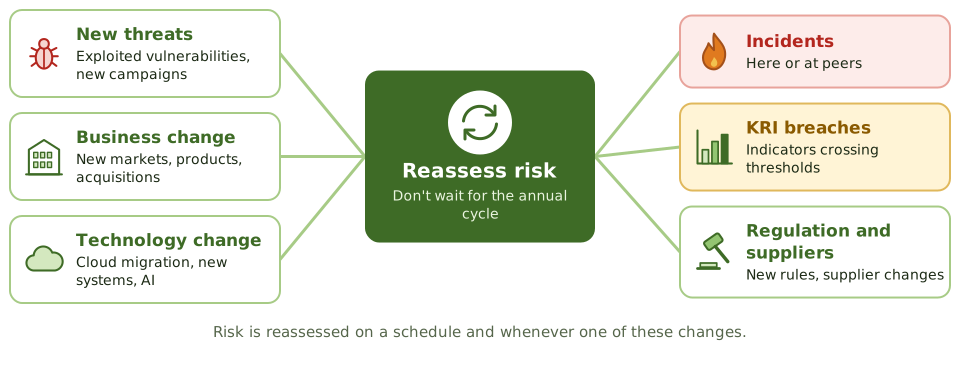
Quality checks
- 1Every entry has a named owner and review date.
- 2Scenarios are specific, not one-word labels.
- 3Ratings use the common scales.
- 4Accepted risks show who accepted and until when.
How the exam asks about it
| If the question asks… | The answer is usually… |
|---|---|
| PRIMARY purpose of the risk register | Record and track risks, owners and responses |
| When to update it | Continuously, on change and new information |
| Accepted risk | Keep it on record with acceptance details and review date |
| Many local registers | Consolidate into one consistent register |
Key takeaways
- ✓The risk register records each risk with its owner, ratings, controls, response, actions and status.
- ✓One consistent register, linked to the enterprise register, beats many local spreadsheets.
- ✓The risk practitioner maintains the register; owners keep their entries accurate.
- ✓Update it on change, incidents, audit findings, KRI breaches and completed actions, not just once a year.
- ✓Closed and accepted risks stay on record with their decisions and review dates.
Exam traps
- !Letting each department keep its own register with different scales.
- !Updating the register only before audits.
- !Deleting accepted risks instead of recording the acceptance.
- !Entries with no named owner or review date.
Using the Risk Register to Support Decisions
How the risk register becomes a management tool rather than an archive: prioritising resources, tracking treatment, building the risk profile and informing budgets, audits and strategy.
From archive to tool
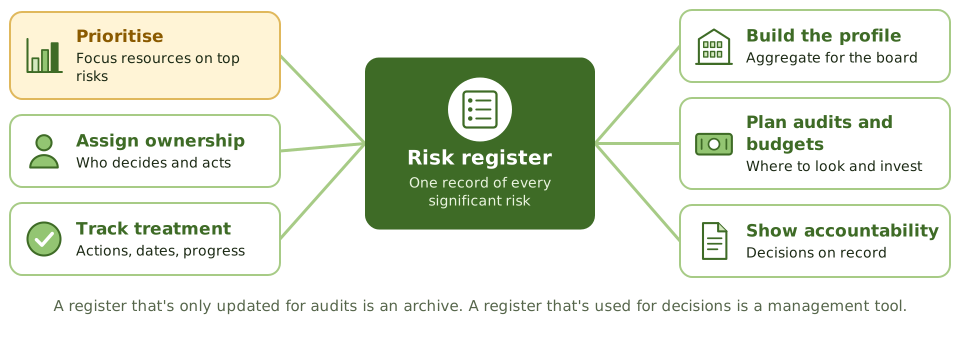
Views that answer questions
| Management question | Register view |
|---|---|
| Where should we spend next year? | Top risks beyond appetite, with costed options |
| Which supplier matters most? | Risks grouped by third party |
| Are we getting better? | Trend of residual ratings over time |
| Who's behind on actions? | Overdue treatment by owner |
Feeding other processes
- 1Budget planning: fund responses to top risks.
- 2Audit planning: focus assurance on high risks.
- 3Project approval: check new risks against the profile.
- 4Strategy: show risks to new objectives.
How the exam asks about it
| If the question asks… | The answer is usually… |
|---|---|
| BEST use of the risk register | Support risk-based decisions and prioritisation |
| What the board should receive | A summarised profile, not the full register |
| Input to the audit plan | High residual risks from the register |
| Many overdue actions | Escalate to owners and senior management |
Key takeaways
- ✓The register's value comes from using it in decisions, not from completing it.
- ✓It supports prioritising resources, assigning ownership, tracking treatment and building the risk profile.
- ✓Filtered views (by owner, process, supplier or trend) answer specific management questions.
- ✓Budgets, audit plans and project approvals should draw on the register.
- ✓Stale or untrusted registers stop being used, so data quality matters.
Exam traps
- !Treating a complete register as the goal.
- !Sending the full register to the board instead of a summarised profile.
- !Planning budgets and audits without reference to the register.
- !Ignoring overdue actions shown in the register.