Topics in this domain
- Exam Technique: Thinking Like a Risk Practitioner
- Aligning IT Risk Management with Business Strategy
- Organisational Structure, Roles and Decision Rights
- Risk Ownership and Accountability
- Segregation of Duties
- Risk Culture and Tone at the Top
- Ethics and Professional Conduct
- Policies, Standards, Procedures and Guidelines
- Policy Lifecycle, Exceptions and Enforcement
- Business Process Review: Ownership and Criticality
- Identifying and Valuing Organisational Assets
- Embedding Asset Management into Risk Governance
- Enterprise Risk Management: Purpose and Principles
- The Risk Practitioner's Role in ERM
- The Three Lines Model and Risk Oversight
- Risk Management Frameworks: ISO 31000, COSO ERM, NIST and COBIT
- Applying a Framework: the Risk Management Life Cycle
- Risk Appetite, Tolerance and Capacity
- Establishing and Maintaining the IT Risk Profile
- Making Risk-Based Business Decisions
- Legal, Regulatory and Contractual Requirements
- Connecting Governance to Risk Outcomes
Establishing and Maintaining the IT Risk Profile
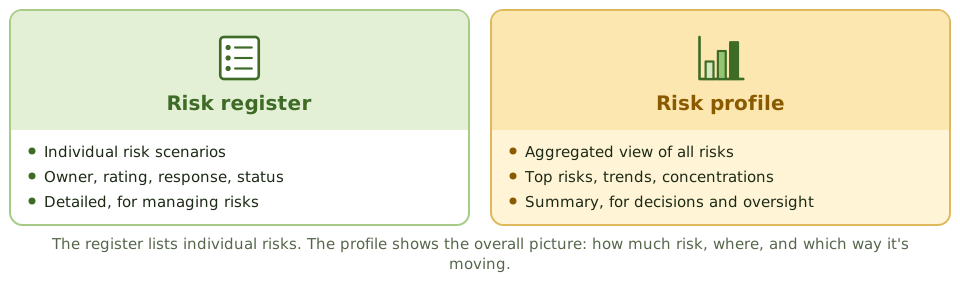
Register versus profile
Building the profile
- Collect risks from the register.
- Group them by category and business area.
- Aggregate them and look for concentrations.
- Compare the result with appetite.
- Show trends and top risks.
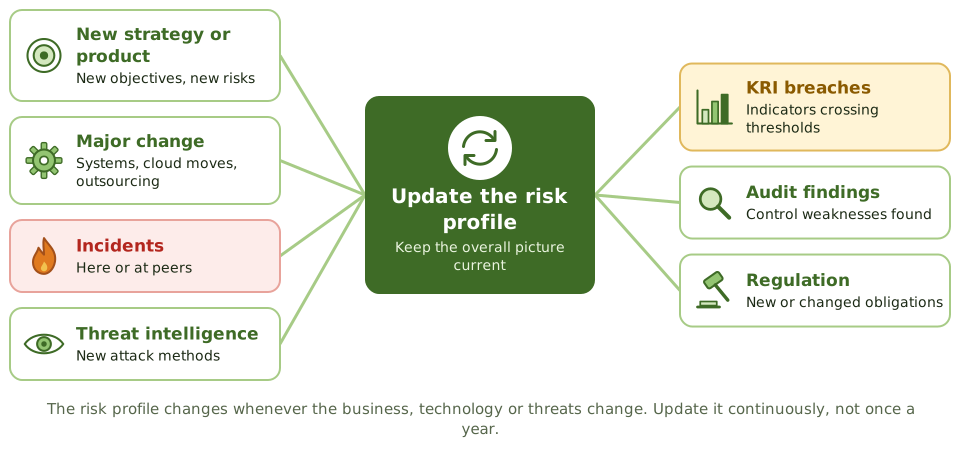
Keeping it current
Aggregation matters
Ten “low” risks on the same customer platform may add up to one significant exposure. Looking at the profile by system, process or supplier shows concentrations that a list of individual risks hides.
Example. Six separate medium risks all depended on one managed service provider. Viewed together in the profile, supplier concentration became a top-five enterprise risk.
How the exam asks about it
| If the question asks… | The answer is usually… |
|---|---|
| PRIMARY purpose of the risk profile | Show the overall risk position against appetite |
| When to update it | Continuously, and on significant change |
| BEST way to show the board IT risk | The profile in business terms, with trends |
| Several small related risks | Consider their aggregated effect |
In short
- The risk profile is the aggregated picture of all risks: how much risk, where it sits and which way it's moving.
- The register lists individual risks; the profile summarises them for oversight and decisions.
- The profile is compared with risk appetite to show whether the organisation is within its limits.
- It must be updated continuously as the business, technology and threats change.
- Aggregation can reveal concentrations that individual risks hide.
Exam traps
- Treating the risk register as if it were the risk profile.
- Updating the profile only once a year.
- Presenting the profile in technical terms the board can't use.
- Missing aggregated risk because each item looks small on its own.
Slides
Click the slide and use the arrow keys. F toggles full screen.
Register versus profile
Keeping it current
1 / 8