Topics in this domain
- The Security Program: Charter, Scope and Objectives
- Security Team Structure, Roles and Staffing
- Working with Legal, HR, IT, Audit and the Business
- Program Implementation: From Plan to Operating Controls
- Information Asset Identification and Valuation
- Data Classification: Owners, Custodians and Users
- Data Lifecycle: Retention, Archiving and Secure Disposal
- Enterprise Architecture for Security Managers
- Information Security Architecture: Principles and SABSA
- Defence in Depth and Zero Trust
- Cloud Security and Shared Responsibility
- Control Frameworks: NIST SP 800-53, CIS Controls and ISO 27002
- Security Policy Development and Lifecycle
- Security Standards and Baseline Requirements
- Procedures, Guidelines and Acceptable Use
- Policy Enforcement, Exceptions and Review
- Designing Security Metrics: KPIs, KRIs and KCIs
- Collecting, Analysing and Reporting Metrics
- Security Maturity Models and Program Assessment
- Control Types and Categories
- Control Design and Selection Based on Risk and Cost
- Control Testing: Design vs Operating Effectiveness
- Identity and Access Management
- Network and Endpoint Security Controls
- Application Security and the Secure SDLC
- Configuration, Change and Patch Management
- Cryptography for Security Managers
- Security Testing: Scanning, Pen Testing and Tracking Remediation
- Security Awareness Program Design
- Role-Based Security Training
- Phishing Simulations and Social Engineering Defences
- Third-Party Risk Management and Due Diligence
- Vendor Contracts, SLAs and Right to Audit
- Fourth-Party and Supply Chain Risk
- Outsourcing and Managed Security Services
- Security Stakeholder Communication
- Executive Dashboards and Board Reporting
- Continuous Improvement of the Security Program
Data Lifecycle: Retention, Archiving and Secure Disposal
Protection follows the data
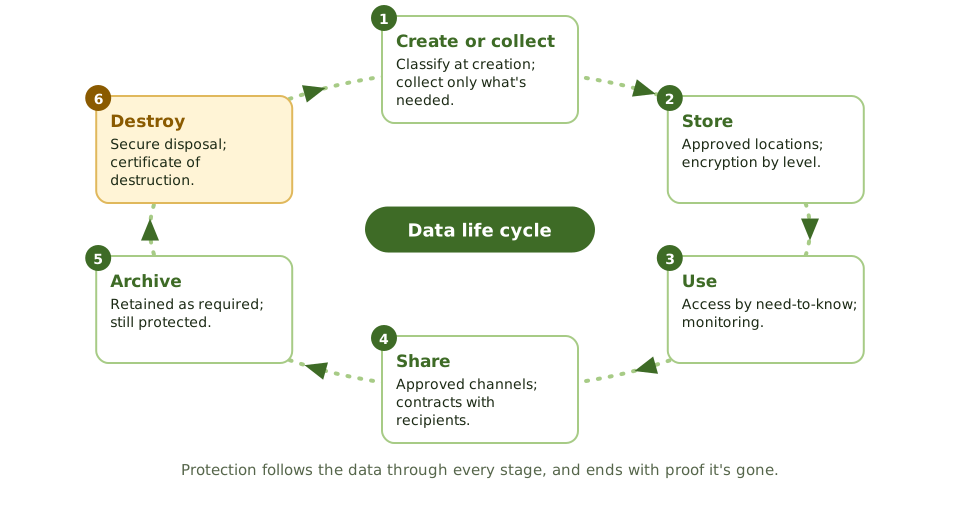
| Stage | Security focus |
|---|---|
| Create or collect | Classify at creation; collect only what’s needed (data minimisation) |
| Store | Approved locations; encryption according to classification |
| Use | Access on a need-to-know basis; monitoring |
| Share | Approved channels; contracts with recipients; DLP |
| Archive | Retained only as required; still protected and recoverable |
| Destroy | Secure disposal; certificate of destruction |
Retention schedules
A retention schedule says how long each type of record is kept, and why:
| Record | Typical driver | Example period |
|---|---|---|
| Financial records | Tax and company law | 6–10 years |
| Employee records | Employment law | Employment plus a few years |
| Customer data | Contract and privacy law | As long as needed for the purpose |
| Security logs | Investigation and regulation | A year or more; sector rules vary |
| CCTV footage | Privacy and security need | 30 days unless there’s an incident |
Legal counsel and records management help set the periods; the security manager makes sure the controls enforce them.
Too long is a risk too
“Keep everything forever” feels safe but isn’t:
- old data nobody needs still leaks in a breach
- privacy laws require storage limitation: personal data kept only as long as needed
- everything kept can be demanded in litigation, at a cost
A legal hold suspends normal deletion when litigation or an investigation is expected, overriding the retention schedule.
Secure disposal
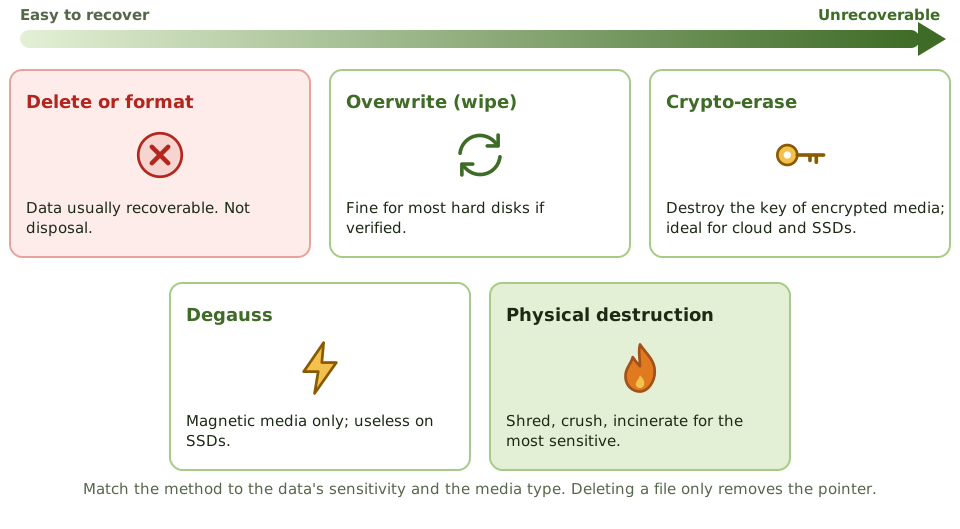
| Method | Notes |
|---|---|
| Delete or format | Removes pointers; data is usually recoverable. Not disposal. |
| Overwrite (wipe) | Suitable for most hard disks, if verified |
| Crypto-erase | Destroy the key of encrypted media; ideal for SSDs and cloud storage |
| Degauss | Magnetic media only; doesn’t work on SSDs |
| Physical destruction | Shred, crush or incinerate; for the most sensitive media |
Disposal, including by suppliers, is documented with certificates of destruction.
Example. A company sells old laptops after a “factory reset”. A buyer recovers customer spreadsheets from one. The new standard: crypto-erase plus verification for all SSDs, and certified physical destruction for drives that held restricted data.
How the exam asks about it
| If the question asks… | The answer is usually… |
|---|---|
| Basis for retention periods | Legal, regulatory, contractual and business requirements |
| Risk of keeping data too long | Greater breach impact; privacy non-compliance |
| Litigation is expected | Apply a legal hold and suspend deletion |
| Disposing of SSDs | Crypto-erase or secure erase, or physical destruction |
| Proof that disposal happened | A certificate of destruction |
In short
- Data moves through a life cycle: create or collect, store, use, share, archive and destroy; protection must follow it at every stage.
- Retention schedules set how long each type of record is kept, based on legal, regulatory, contractual and business needs.
- Keeping data longer than needed increases risk and may break privacy law (storage limitation).
- Legal holds suspend normal deletion when litigation or investigation is expected.
- Disposal must make data unrecoverable: wiping, crypto-erasure, degaussing or physical destruction, matched to the media and sensitivity.
- Disposal of devices and media, including by suppliers, is documented with certificates of destruction.
Exam traps
- Deleting or formatting doesn't remove data; it can usually be recovered.
- Degaussing doesn't work on solid-state drives.
- 'Keep everything forever' is a risk, not a safe default.
- A legal hold overrides the normal retention schedule.
Slides
Click the slide and use the arrow keys. F toggles full screen.
Protection follows the data
Secure disposal
ExampleA company sells old laptops after a 'factory reset'. A buyer recovers customer spreadsheets from one. The new standard: crypto-erase plus verification for all SSDs, and certified physical destruction for drives that held restricted data.
1 / 8