Topics in this domain
- Risk Management Concepts and Frameworks
- Inherent Risk, Residual Risk, Appetite and Tolerance
- Threat Actors, Motivations and Attack Vectors
- The Evolving Threat Landscape: AI, Cloud and Supply Chain
- Threat Modelling and Cyber Threat Intelligence
- Vulnerability Assessment and Scanning
- Control Deficiencies and Security Gap Analysis
- The Risk Assessment Process
- Qualitative Risk Analysis: Likelihood and Impact
- Quantitative Risk Analysis: SLE, ALE and Loss Estimation
- Risk Scenarios and Prioritisation
- Risk Treatment Options: Mitigate, Transfer, Avoid, Accept
- Risk Acceptance: Approval, Expiry and Review
- Cost-Benefit Analysis for Risk Treatment
- Risk Ownership vs Control Ownership
- RACI and Risk Escalation Paths
- The Risk Register
- Continuous Risk Monitoring and Key Risk Indicators
- Risk Reporting to Executives and the Board
- Integrating Risk Management into Business and IT Processes
RACI and Risk Escalation Paths
Who does what, exactly?
“Security is everyone’s job” is true, but unhelpful when a decision is needed. A RACI chart lists key activities and says, for each one, who does it, who answers for it, who must be asked and who must be told.
| Letter | Meaning | Rule |
|---|---|---|
| Responsible | Does the work | Can be several people |
| Accountable | Answers for the result; approves | Exactly one per activity |
| Consulted | Gives input before the decision | Two-way communication |
| Informed | Told afterwards | One-way communication |
A RACI example
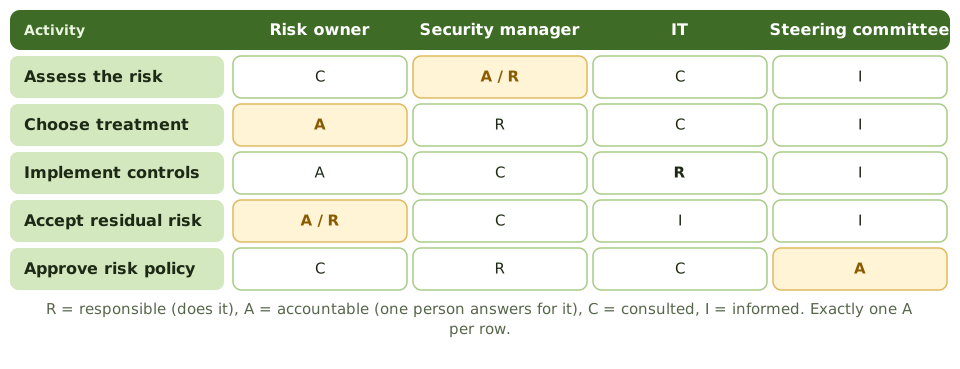
| Activity | Risk owner | Security manager | IT | Steering committee |
|---|---|---|---|---|
| Assess the risk | C | A / R | C | I |
| Choose treatment | A | R | C | I |
| Implement controls | A | C | R | I |
| Accept residual risk | A / R | C | I | I |
| Approve risk policy | C | R | C | A |
Escalation paths
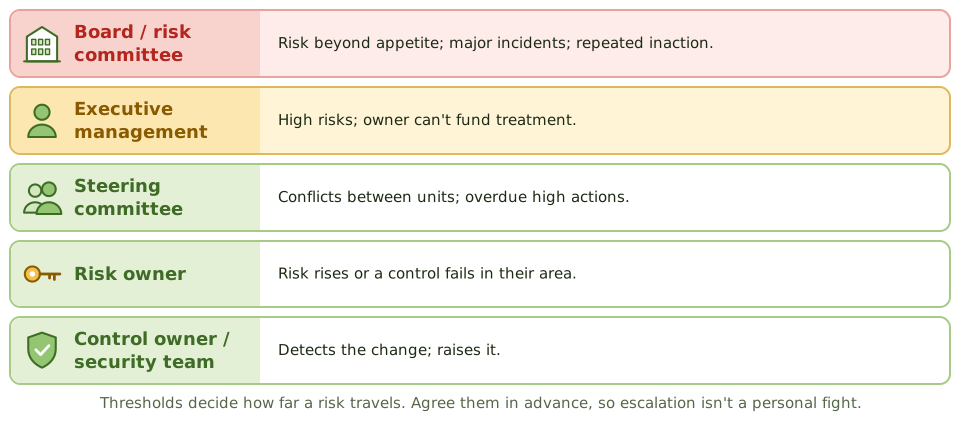
Escalation sends a risk to the level of authority that matches its size. Agreed thresholds decide how far it travels: a medium risk might stop at the risk owner, a high risk at the executive, and anything beyond appetite goes to the board or its risk committee.
When to escalate
- residual risk exceeds appetite or the owner’s authority
- an owner can’t, or won’t, act on a high risk
- remediation actions are significantly overdue
- a major incident, or a new high-impact threat
- conflict between business units over a risk decision
Example. A business unit has delayed fixing a high-rated access risk for three quarters. Under the agreed thresholds, the security manager takes it to the steering committee, which sets a deadline and funds a contractor. No personal confrontation is needed.
Escalating a business risk isn’t disloyalty. Making sure the right people decide is part of the security manager’s job.
How the exam asks about it
| If the question asks… | The answer is usually… |
|---|---|
| How many Accountable people per activity? | Exactly one |
| The person who does the work | Responsible |
| An owner won’t treat a high risk | Escalate through the agreed path |
| Benefit of agreed escalation thresholds | Consistent, timely, non-personal escalation |
| Where does risk beyond appetite go? | Senior management / the board |
In short
- RACI shows who is Responsible (does the work), Accountable (answers for it), Consulted and Informed for each activity.
- Each activity has exactly one Accountable person; several people can be Responsible.
- RACI charts remove confusion about who decides, who acts and who just needs to know.
- Escalation paths send risks to the level of authority that matches their size, using agreed thresholds.
- Escalate when risk exceeds appetite, an owner can't or won't act, actions are overdue, or a major incident occurs.
- Pre-agreed escalation criteria make escalation routine rather than personal.
Exam traps
- Two Accountable people for one activity means nobody is really accountable.
- The security manager escalating a business risk isn't disloyalty; it's the job.
- Escalation goes up the line of authority, not straight to the board for everything.
- Responsible and Accountable are different: the person doing the work isn't necessarily the one who answers for it.
Slides
Click the slide and use the arrow keys. F toggles full screen.
A RACI example
Escalation paths