Topics in this domain
- Risk Management Concepts and Frameworks
- Inherent Risk, Residual Risk, Appetite and Tolerance
- Threat Actors, Motivations and Attack Vectors
- The Evolving Threat Landscape: AI, Cloud and Supply Chain
- Threat Modelling and Cyber Threat Intelligence
- Vulnerability Assessment and Scanning
- Control Deficiencies and Security Gap Analysis
- The Risk Assessment Process
- Qualitative Risk Analysis: Likelihood and Impact
- Quantitative Risk Analysis: SLE, ALE and Loss Estimation
- Risk Scenarios and Prioritisation
- Risk Treatment Options: Mitigate, Transfer, Avoid, Accept
- Risk Acceptance: Approval, Expiry and Review
- Cost-Benefit Analysis for Risk Treatment
- Risk Ownership vs Control Ownership
- RACI and Risk Escalation Paths
- The Risk Register
- Continuous Risk Monitoring and Key Risk Indicators
- Risk Reporting to Executives and the Board
- Integrating Risk Management into Business and IT Processes
The Risk Register
One place for every risk
Risks turn up in risk assessments, audits, incidents, projects and supplier reviews. They need one home. The risk register is that home: a living record of what could go wrong, who owns it, what’s being done and how it’s changing.
Information risks should sit in the enterprise risk register, or be clearly linked to it, so the board sees them alongside credit, operational and strategic risks.
What’s in a row
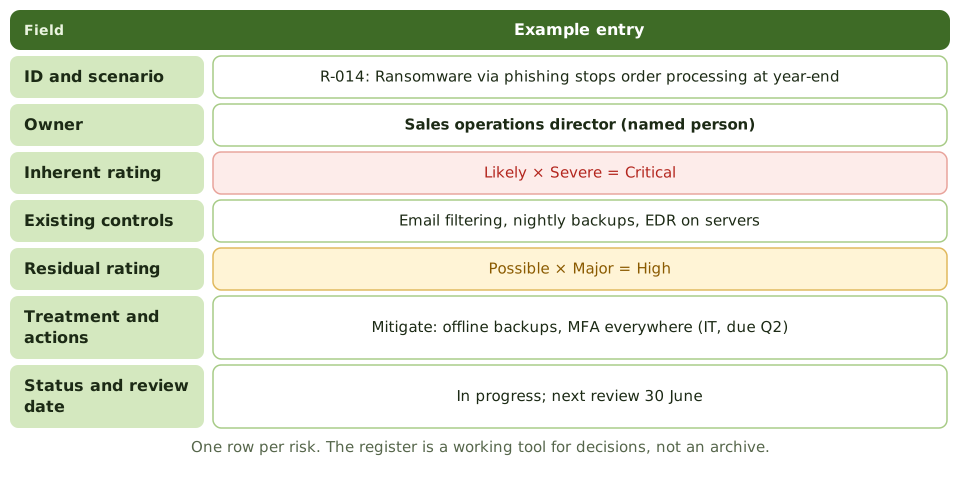
| Field | Example |
|---|---|
| ID and scenario | R-014: Ransomware via phishing stops order processing at year-end |
| Owner | Sales operations director (a named person) |
| Inherent rating | Likely × Severe = Critical |
| Existing controls | Email filtering, nightly backups, EDR on servers |
| Residual rating | Possible × Major = High |
| Treatment and actions | Mitigate: offline backups and MFA everywhere (IT, due Q2) |
| Status and review date | In progress; next review 30 June |
Other common fields include the risk category, links to related controls and incidents, KRIs and the acceptance record.
Keeping it alive
A register updated once a year is a snapshot, not a management tool. Update it:
- after assessments: new risks added, ratings refreshed
- after incidents: ratings and controls reconsidered
- on change: new systems, suppliers and regulations
- as treatment progresses: actions completed, overdue or blocked
Using it for decisions
- top-risk reports for the steering committee and board
- trends: which risks are rising or falling
- overdue treatment actions and their owners
- accepted risks and their expiry dates
- input to budget and roadmap priorities
Example. Before the budget round, the security manager filters the register for residual High risks with no funded action. Five appear; each becomes a line in the business case, with its risk owner as sponsor.
The register is effectively a map of the organisation’s weaknesses, so access to it should be restricted.
How the exam asks about it
| If the question asks… | The answer is usually… |
|---|---|
| Main purpose of a risk register | A central record to track and manage risks |
| Key fields | Owner, ratings, treatment, status, review date |
| When to update it | Continuously: assessments, incidents and changes |
| Best home for information risks | Integrated with the enterprise risk register |
| Who should see it? | Restricted access; it reveals the organisation’s weaknesses |
In short
- A risk register is the central record of identified risks, their owners, ratings, treatments and status.
- Typical fields: ID and scenario, owner, inherent and residual ratings, existing controls, treatment decision, actions, due dates, status, review date.
- Information risks should sit in, or link to, the enterprise risk register so they're seen alongside other business risks.
- The register is updated after assessments, incidents, changes and treatment progress; stale registers mislead.
- It feeds reporting: top risks, trends, overdue actions and accepted risks.
- Access to the register should be controlled; it's effectively a map of the organisation's weaknesses.
Exam traps
- A register that's only updated once a year is a snapshot, not a management tool.
- Listing risks without owners, ratings or actions isn't risk management.
- Separate, unlinked security and enterprise registers hide information risk from the board.
- The register itself is sensitive; protect it.
Slides
Click the slide and use the arrow keys. F toggles full screen.
What's in a row