Topics in this domain
- Event vs Incident vs Breach
- Developing the Incident Response Plan
- Incident Response Team Roles and Authority
- Incident Classification and Severity Levels
- Incident Response Playbooks and Decision Trees
- Escalation and Communication Plans
- Business Impact Analysis
- RTO, RPO, MTD and Recovery Prioritisation
- Business Continuity Planning and Strategies
- Crisis Management and Continuity Governance
- Disaster Recovery Planning
- Recovery Sites: Hot, Warm and Cold
- Backup Strategies and Cloud DR
- Incident Response Training
- Testing Plans: Tabletop, Functional and Full Interruption
- Evaluating Exercises and Improving Readiness
- Security Event Detection and Monitoring Methods
- SIEM, the SOC and Event Correlation
- Threat Intelligence and Indicators of Compromise
- Incident Triage and Initial Investigation
- Evidence Preservation, Forensics and Chain of Custody
- Containment Strategies: Short-Term and Long-Term
- Making Containment Decisions
- Breach Notification and Regulatory Reporting
- External Communications: Customers, Media and Law Enforcement
- Eradication, Recovery and Return to Normal Operations
- Post-Incident Review and Root Cause Analysis
- Lessons Learned and Incident Trend Analysis
Backup Strategies and Cloud DR
Backups meet the RPO
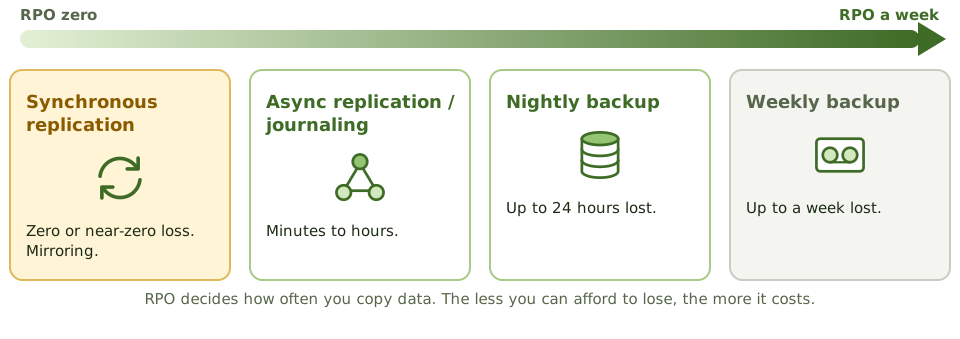
The RPO from the BIA decides how often data must be copied:
| Method | Possible data loss |
|---|---|
| Synchronous replication / mirroring | Zero or near zero |
| Asynchronous replication / journaling | Minutes to hours |
| Nightly backup | Up to 24 hours |
| Weekly backup | Up to a week |
Backup types
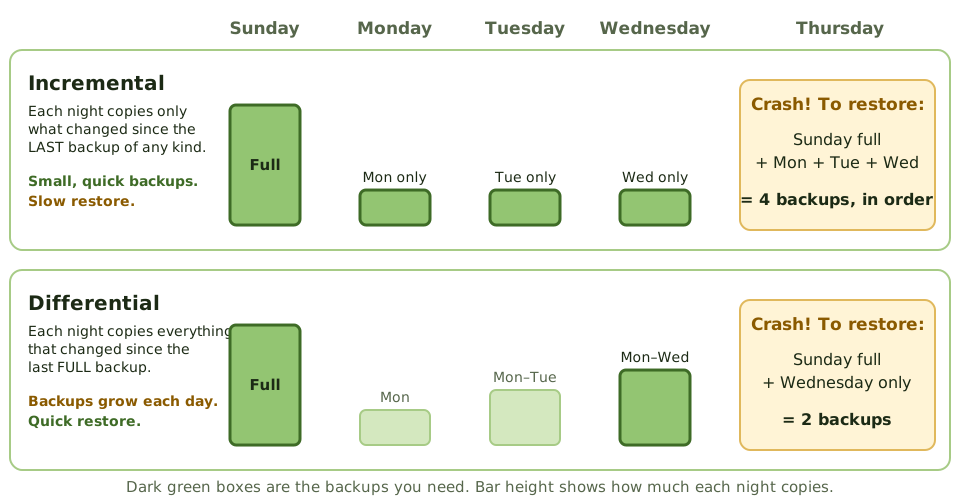
- Full: everything, every time. Simplest restore, slowest backup.
- Incremental: changes since the last backup of any kind. Fastest backup; restore needs the full plus every incremental since.
- Differential: changes since the last full backup. Restore needs the full plus the latest differential.
Replication and RAID aren’t backups: they copy deletions, corruption and ransomware instantly.
Ransomware changed the rules
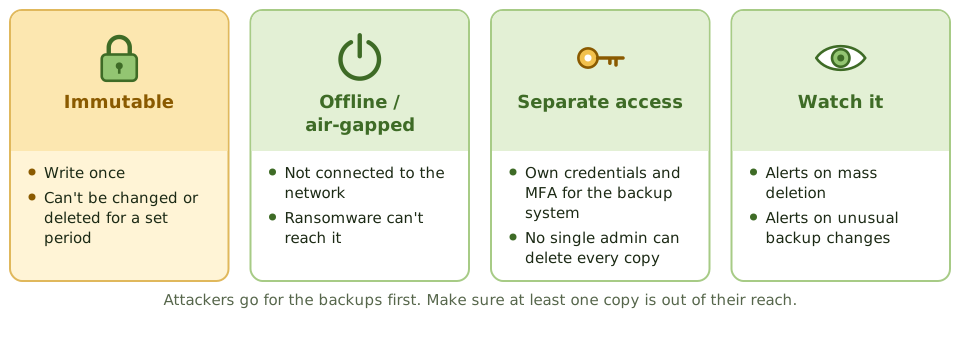
Ransomware groups hunt for backups first. At least one copy must be immutable (can’t be changed or deleted for a set period) or offline, with separate credentials and MFA, and monitoring for mass deletion.
The 3-2-1-1-0 rule
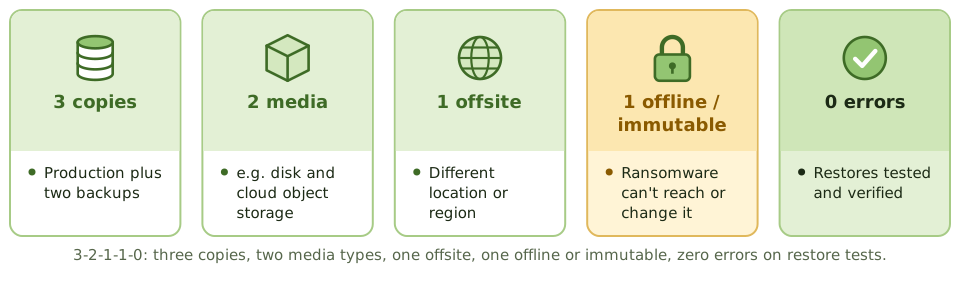
Three copies, on two media types, one offsite, one offline or immutable, and zero errors in restore tests. A “backup job succeeded” message isn’t proof; only a successful, timed restore test is.
Cloud and SaaS
- Cloud DR: replicate to another region, as a pilot light or warm standby.
- SaaS data: the provider protects its platform, but deletion or ransomware of your data may be your problem. Check the shared responsibility model; you may need your own backups.
- Separate accounts: keep backups in a separate cloud account with its own administrators.
- Test restores, timed against the RTO.
Example. An attacker with a cloud admin’s credentials deletes production databases and their snapshots in the same account. The company recovers because backups were also copied to a separate, locked account with immutable retention, which the stolen credentials couldn’t touch.
How the exam asks about it
| If the question asks… | The answer is usually… |
|---|---|
| Metric that sets backup frequency | RPO |
| Best protection for backups against ransomware | Offline or immutable copies with separate credentials |
| Best evidence that backups work | Successful restore tests |
| Is replication a backup? | No; it copies errors and ransomware too |
| Who protects SaaS data from deletion? | Often the customer; check the shared responsibility model |
In short
- Backup frequency and method are driven by the RPO: daily backups mean up to a day of lost data; replication can cut that to minutes or zero.
- Full, incremental and differential backups trade backup time against restore time.
- Replication and RAID aren't backups: they copy deletions, corruption and ransomware instantly.
- Ransomware targets backups first, so at least one copy must be offline or immutable, with separate credentials.
- The 3-2-1-1-0 rule: three copies, two media, one offsite, one offline or immutable, zero errors in restore tests.
- Only a successful restore test proves a backup works; cloud DR still needs tested runbooks and the customer's own backups of SaaS data.
Exam traps
- 'Backup job succeeded' isn't proof that data can be restored.
- Backups reachable with the same admin credentials as production get encrypted too.
- SaaS providers protect their platform, not necessarily your data from deletion or ransomware.
- Keeping backups in the same building or region doesn't protect against site disasters.
Slides
Click the slide and use the arrow keys. F toggles full screen.
Backups meet the RPO
Backup types
Ransomware changed the rules
The 3-2-1-1-0 rule