Topics in this domain
- IT Risk Events, Loss Types and Business Outcomes
- Threat Sources, Actors and Motivations
- The Changing Threat Landscape and Threat Modelling
- Vulnerabilities, Control Deficiencies and Risk Conditions
- Identifying Internal and External Risk Factors
- Building IT Risk Scenarios
- Evaluating Scenarios for Completeness and Relevance
- Common Risk Scenario Errors
- Risk Assessment Concepts and Standards
- Qualitative, Semi-Quantitative and Quantitative Analysis
- Quantitative Methods: ALE, FAIR and Monte Carlo
- Risk Analysis Techniques: Bow-Tie, Fault Tree, Event Tree and Delphi
- Choosing a Consistent Assessment Methodology
- Translating Technical Events into Business Impact
- Business Impact Analysis for Risk Prioritisation
- Inherent and Residual Risk
- Evaluating Risk Against Business Objectives and Appetite
- Creating and Maintaining the IT Risk Register
- Using the Risk Register to Support Decisions
Creating and Maintaining the IT Risk Register
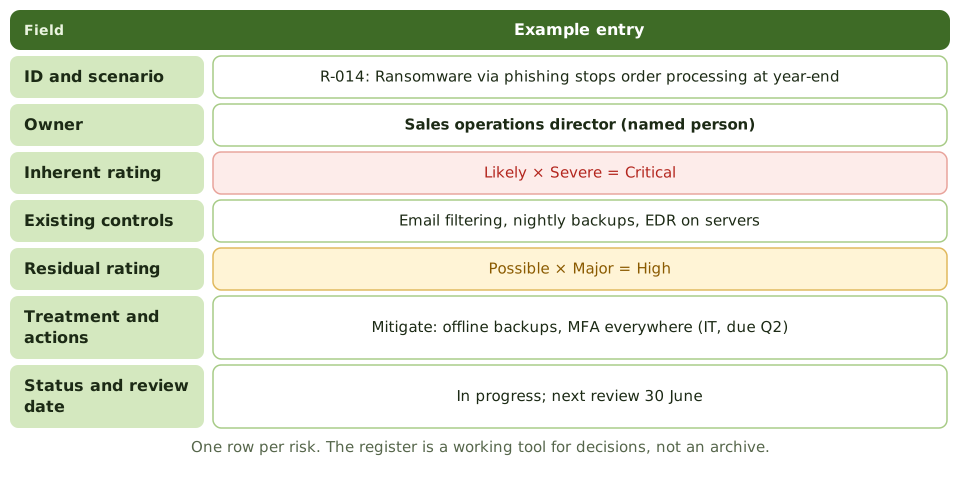
What a register holds
Who does what
| Role | Register responsibility |
|---|---|
| Risk practitioner | Maintains its structure, quality and consistency |
| Risk owner | Keeps their entries accurate; approves responses |
| Control and action owners | Update action status |
| Senior management | Reviews top risks and trends |
One consistent register, linked to the enterprise register, beats many local spreadsheets with different scales.
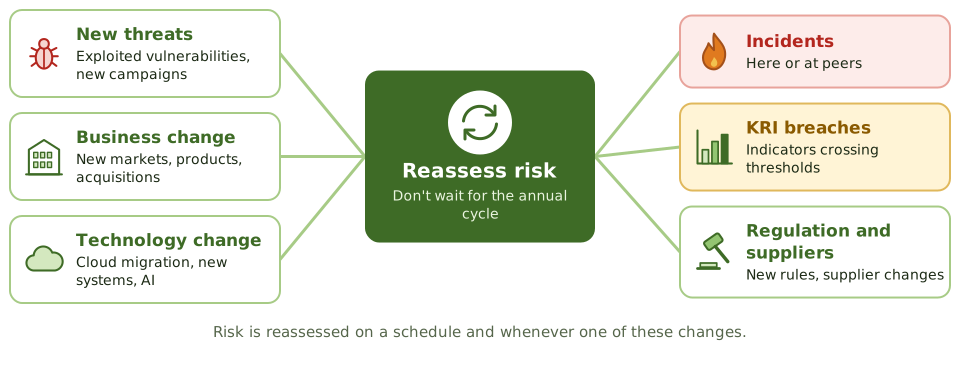
Keeping it current
Quality checks
- Every entry has a named owner and a review date.
- Scenarios are specific, not one-word labels.
- Ratings use the common scales.
- Accepted risks show who accepted them and until when.
Example. A register review finds 30% of entries with no owner and 15 risks still open for systems retired last year. Cleaning it up and assigning owners cuts the active list by a quarter and makes the top risks clear.
How the exam asks about it
| If the question asks… | The answer is usually… |
|---|---|
| PRIMARY purpose of the risk register | Record and track risks, owners and responses |
| When to update it | Continuously, on change and new information |
| Accepted risk | Keep it on record with acceptance details and a review date |
| Many local registers | Consolidate into one consistent register |
In short
- The risk register records each risk with its owner, ratings, controls, response, actions and status.
- One consistent register, linked to the enterprise register, beats many local spreadsheets.
- The risk practitioner maintains the register; owners keep their entries accurate.
- Update it on change, incidents, audit findings, KRI breaches and completed actions, not just once a year.
- Closed and accepted risks stay on record with their decisions and review dates.
Exam traps
- Letting each department keep its own register with different scales.
- Updating the register only before audits.
- Deleting accepted risks instead of recording the acceptance.
- Entries with no named owner or review date.
Slides
Click the slide and use the arrow keys. F toggles full screen.
What a register holds
Keeping it current
1 / 8