Topics in this domain
- Enterprise Architecture and IT Risk
- Change Management Risk
- Assets, Configuration and Dependencies
- Incident and Problem Management Oversight
- Vulnerability and Patch Management Risk
- Security Monitoring, Logging and Detection
- Project Governance and IT Risk
- Governing the Secure SDLC
- DevOps, CI/CD and Agile Delivery Risk
- Testing, Release and Deployment Risk
- Data Classification, Ownership and Handling
- Data Lifecycle: Integrity, Retention and Disposal
- Business Continuity Planning and Governance
- Disaster Recovery and Testing Recovery Capability
- Emerging Technology Risk: Cloud, IoT and OT
- AI and Machine Learning Risk
- Setting Risk Boundaries for Innovation
- Core Security Concepts: CIA, IAM, Cryptography and Network Security
- Security Frameworks and Control Standards
- Security Awareness Culture and Measuring Training
- Privacy Governance and Data Protection Principles
- Developing a Data Protection Control Strategy
- Identity and Access Management Risk
Identity and Access Management Risk
Identity is the new perimeter
When systems sit in the cloud and staff log in from anywhere, the network edge protects very little. Most attacks now start with a stolen or misused identity. Identity and access management (IAM) decides who can get in and what they can do once they’re there.
Example. An attacker phishes a finance clerk’s password. With no MFA and broad access, they reach the payment system within an hour. The firewall never saw anything unusual.
IAM combines identification (who you claim to be), authentication (proving it), authorisation (what you may do) and accountability (logging what you did).
Joiners, movers and leavers
Most access problems arise as people join, change jobs and leave. The diagram shows the identity life cycle and where it goes wrong.
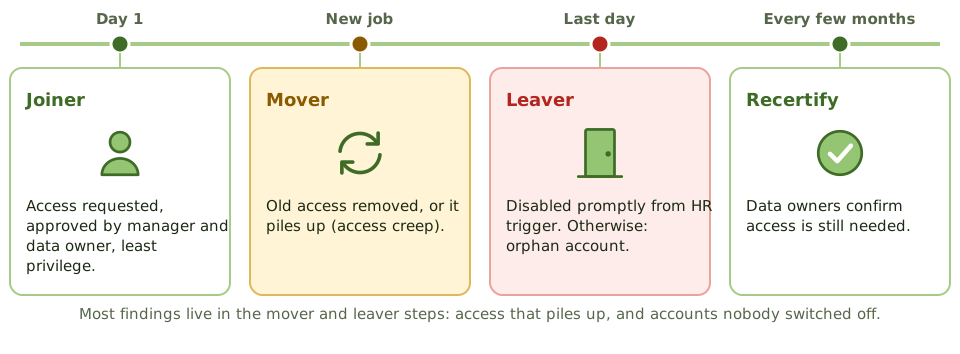
- Joiners get access approved by their manager and the data owner, based on least privilege, ideally through roles.
- Movers should lose old access when they gain new access. When they don’t, rights pile up (access creep) and create segregation of duties conflicts.
- Leavers should be disabled promptly, triggered automatically by HR. Accounts left active are orphan accounts, a favourite route for attackers and disgruntled ex-staff.
- Recertification: data owners regularly confirm that each person still needs their access. A review where managers approve everything without looking gives false comfort.
The most powerful accounts
Privileged accounts (administrators, database owners, cloud root accounts) can change anything, including logs. They need the strongest controls:
- named accounts, never shared, so every action is traceable
- phishing-resistant MFA, with passwords held in a vault and rotated
- just-in-time access: rights granted for a task and removed afterwards
- session logging, reviewed by someone independent of the admins
Indicators of access risk
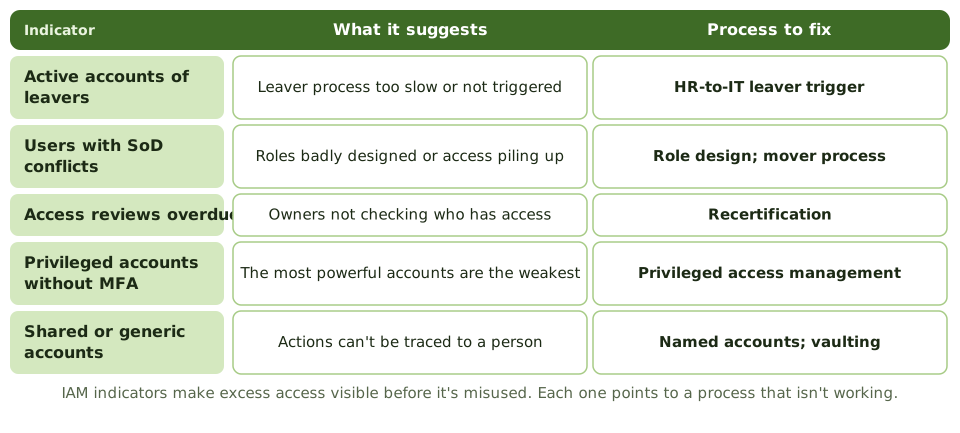
A few indicators make excess access visible before it’s misused. The diagram links each one to the process that’s failing. Leavers’ accounts still active point to a slow or missing HR-to-IT leaver trigger. Users with SoD conflicts point to badly designed roles or access piling up as people move. Overdue access reviews mean owners aren’t checking who has access. Privileged accounts without MFA leave the most powerful accounts the weakest. Shared or generic accounts mean actions can’t be traced to a person, and are fixed with named accounts and password vaulting.
Non-human identities
Service accounts, API keys, bots and third-party accounts often outnumber people. They rarely have an owner, seldom change their credentials, and often have far more access than they need. Each one needs an accountable owner, least privilege, secure storage of its secrets, and regular review.
How the exam asks about it
| If the question asks… | The answer is usually… |
|---|---|
| Who approves access to data | The data owner |
| BEST control for privileged accounts | Privileged access management with MFA and monitoring |
| Leavers’ accounts still active | Fix the HR-to-IT leaver trigger |
| Access creep after job changes | Mover process and recertification |
| Most important control for remote access | Multi-factor authentication |
In short
- Identity and access management (IAM) controls who can access what, and is the main defence now that systems sit in the cloud and staff work anywhere.
- The biggest IAM risks are in the mover and leaver steps: access that piles up, and accounts left active.
- Privileged accounts need the strongest controls: named accounts, MFA, just-in-time access, vaulting and monitoring.
- Data owners, not IT, approve and recertify access to their data.
- IAM KRIs, such as leavers' accounts still active, make excess access visible.
Exam traps
- Letting IT decide who should have access to business data.
- Recertification where managers approve everything without looking.
- Shared admin accounts, which make actions untraceable.
- Forgetting service accounts, API keys and third-party accounts.
Slides
Click the slide and use the arrow keys. F toggles full screen.
Turn your phone sideways for a bigger view. Tap any diagram to enlarge it.
Joiners, movers and leavers
Indicators of access risk